
Circle Pattern
Loading the math board and drawing, please wait…
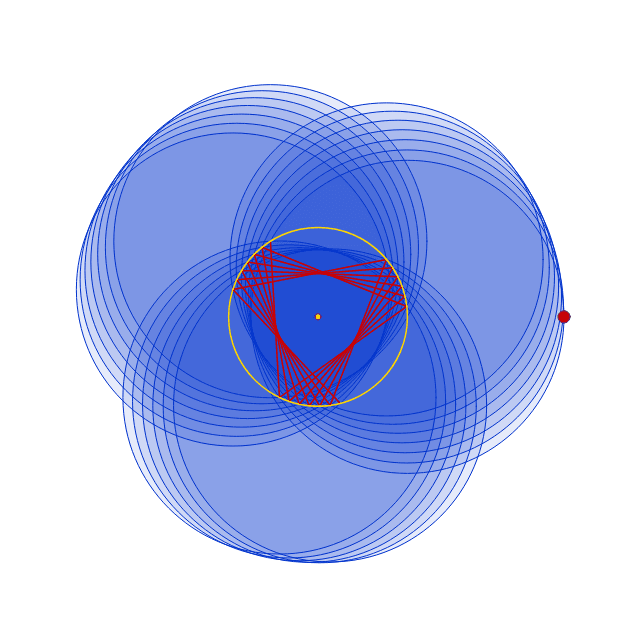
This example demonstrates the dynamic arrangement of circles by dragging a point, involving core math concepts like circle, coordinate geometry, parametric curves, and geometric construction. It uses GeoGebra commands such as Circle, Ray, Point, Intersect, and Segment. Suitable for high school and above to explore parametric equations and dynamic geometry phenomena.
GeoGebra Commands & Parameters
Circle((0, 0), 10) → cRay((0, 0), (20, 0)) → rPoint(r) → ACircle((10, 0), A) → A1Intersect(c, A1, 1) → B1Circle(B1, Radius[A1]) → A2Intersect(c, A2, 1) → B2Circle(B2, Radius[A2]) → A3Intersect(c, A3, 1) → B3Circle(B3, Radius[A3]) → A4Intersect(c, A4, 1) → B4Circle(B4, Radius[A4]) → A5Intersect(c, A5, 1) → B5Circle(B5, Radius[A5]) → A6Intersect(c, A6, 1) → B6Circle(B6, Radius[A6]) → A7Intersect(c, A7, 1) → B7Circle(B7, Radius[A7]) → A8Intersect(c, A8, 1) → B8Circle(B8, Radius[A8]) → A9Intersect(c, A9, 1) → B9Circle(B9, Radius[A9]) → A10Intersect(c, A10, 1) → B10Circle(B10, Radius[A10]) → A11Intersect(c, A11, 1) → B11Circle(B11, Radius[A11]) → A12Intersect(c, A12, 1) → B12Circle(B12, Radius[A12]) → A13Intersect(c, A13, 1) → B13Circle(B13, Radius[A13]) → A14Intersect(c, A14, 1) → B14Circle(B14, Radius[A14]) → A15Intersect(c, A15, 1) → B15Circle(B15, Radius[A15]) → A16Intersect(c, A16, 1) → B16Circle(B16, Radius[A16]) → A17Intersect(c, A17, 1) → B17Circle(B17, Radius[A17]) → A18Intersect(c, A18, 1) → B18Circle(B18, Radius[A18]) → A19Intersect(c, A19, 1) → B19Circle(B19, Radius[A19]) → A20Intersect(c, A20, 1) → B20Segment(B1, B2) → C2Segment(B2, B3) → C3Segment(B3, B4) → C4Segment(B4, B5) → C5Segment(B5, B6) → C6Segment(B6, B7) → C7Segment(B7, B8) → C8Segment(B8, B9) → C9Segment(B9, B10) → C10Segment(B10, B11) → C11Segment(B11, B12) → C12Segment(B12, B13) → C13Segment(B13, B14) → C14Segment(B14, B15) → C15Segment(B15, B16) → C16Segment(B16, B17) → C17Segment(B17, B18) → C18Segment(B18, B19) → C19Segment(B19, B20) → C20
AI Drawing Prompt Reference
Draw a circle centered at the origin with a radius of 10, then add a ray extending to the right from the origin. Mark a point on the ray and draw a circle using this point as the center that intersects the first circle. Get the intersection point, then draw another circle with the intersection point as the center and the radius of the previous circle. Repeat this process multiple times to create a series of nested circles. Finally, connect the adjacent intersection points with line segments to form a dynamic circular pattern.
The prompt above was compiled from the original drawing commands and is for reference only.