
Circle Packing
Loading the math board and drawing, please wait…
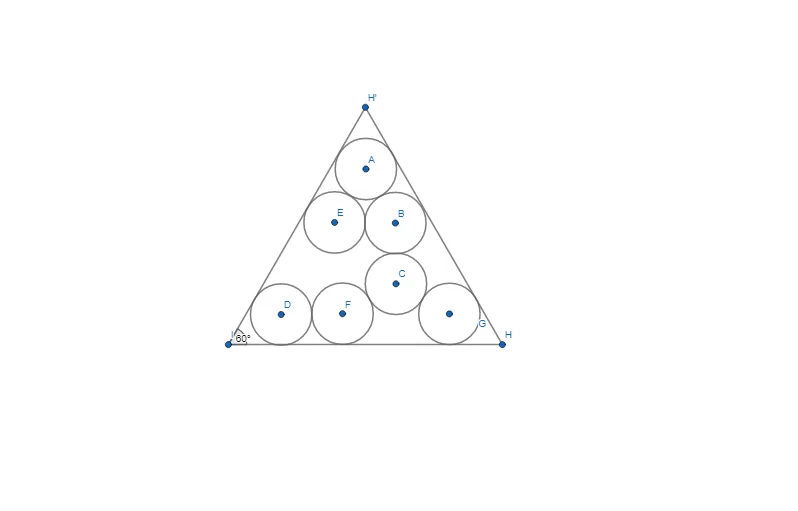
This GeoGebra example demonstrates circle packing, a geometric phenomenon where circles are arranged to fill space efficiently or solve optimization problems. Key mathematical concepts include circles, optimization problems, inequalities, ellipses, trigonometric functions, parametric curves, scalene triangles, and expected value. The construction utilizes GeoGebra commands such as Circle, Point, Segment, Rotate, Angle, and LineBisector to create points, segments, and circles, with objects like A, c, B, d, etc., and parameters like α, i, j. It is suitable for high school or college-level mathematics education, particularly in geometry, optimization, and inequality topics.
GeoGebra Commands & Parameters
Circle(A, 1) → cCircle(B, 1) → dCircle(C, 1) → eCircle(D, 1) → fCircle(E, 1) → gCircle(F, 1) → hCircle(G, 1) → kPoint(Circle[I, 2 + (4 * sqrt(3))]) → HSegment(I, H) → lRotate(H, 60°, I) → H'Angle(H, I, H') → αSegment(I, H') → iSegment(H', H) → jLineBisector(I, H) → mLineBisector(H, H') → n
AI Drawing Prompt Reference
Draw seven equal circles centered at seven points arranged in a close packing; then draw a larger circle centered at a point with radius 2 plus 4 times the square root of 3, pick a point on this circle, join it to the center, rotate that point 60 degrees about the center to obtain a second point, mark the angle between the two radii, and construct the segments from the center to the second point, between the two points, and the perpendicular bisectors of the center‑first point segment and the segment joining the two points.
The prompt above was compiled from the original drawing commands and is for reference only.