
Circle - Central Angle and Intercepted Arc
Loading the math board and drawing, please wait…
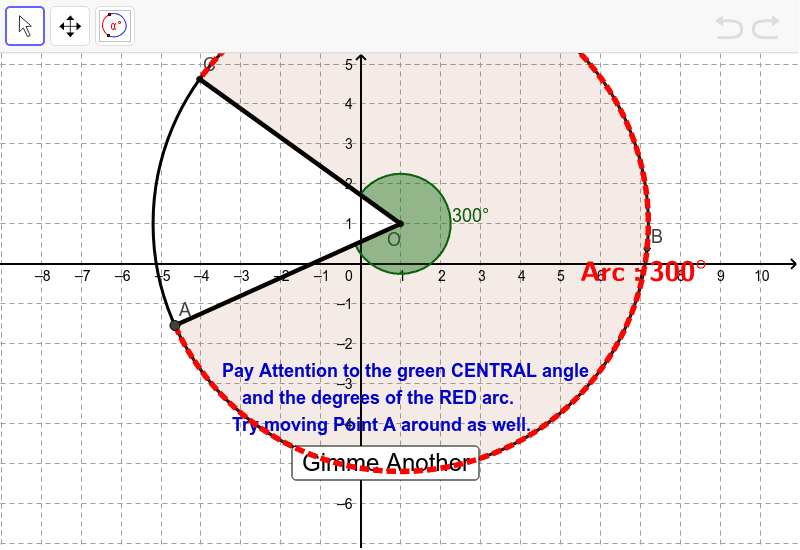
This example demonstrates the relationship between the central angle and the intercepted arc in a circle. Key mathematical concepts include circle, angle, and arc. Using GeoGebra commands such as Circle, Angle, and ArcDeg, the example dynamically shows how the intercepted arc changes with the central angle. Suitable for middle school and above students to learn about circle properties.
GeoGebra Commands & Parameters
Element(Dimension[Arc1Arc2Radius], 1) → NumberOfEquationsRandom(1, NumberOfEquations) → CircleCounterElement(Arc1Arc2Radius, CircleCounter) → targetCircleCoefTextfield(h) → inputBox1Textfield(k) → inputBox2Textfield(r) → inputBox3Random(1, 4) → WhichPointElement(targetCircleCoef, 1) → Arc1Element(targetCircleCoef, 2) → Arc2Element(targetCircleCoef, 3) → radiusCircle(YourCenter, radius) → cMod(CircleCounter + 1, NumberOfEquations + 1) → counterPoint(c) → ARandom(1, (360 - Arc1 - Arc2) / 2) → MissingArcBetween1and2Rotate(A, α°, YourCenter) → CAngle(A, YourCenter, C) → AngleArc1ArcDeg(c, A, C) → d, text1Rotate(C, MissingArcBetween1and2°, YourCenter) → DAngle(C, YourCenter, D) → AngleArcCDRotate(D, Arc2°, YourCenter) → FAngle(D, YourCenter, F) → AngleArc2ArcDeg(c, D, F) → e, text3Segment(YourCenter, A) → aSegment(YourCenter, C) → bRotate(A, (Arc1 / 2)°, YourCenter) → BAngle(A, YourCenter, B) → εRotate(D, (Arc2 / 2)°, YourCenter) → EAngle(D, YourCenter, E) → ζCircumference(c) → CircCircumfArea(c) → CircAreaTextfield(YourArea) → inputBox4Textfield(YourCircumference) → inputBox5Textfield(YourSectorAOC) → inputBox6Textfield(YourArcACLength) → inputBox7Textfield(YourAngleAOC) → inputBox8Textfield(YourAngleFOD) → inputBox9Textfield(YourArcACdegree) → inputBox10Textfield(YourArcFDdegree) → inputBox11Textfield(YourRadius) → inputBox12Textfield(YourDiameter) → inputBox13CircumcircleSector(A, B, C) → f
AI Drawing Prompt Reference
Draw a circle with center O and radius r. Select two points A and C on the circle such that ∠AOC is α degrees and the arc length AC is d degrees. Then select point D on the circle such that ∠COD is β degrees and the arc length FD is e degrees. Finally, draw the circumference and area of the circle, and label the central angle ∠AOC, the inscribed angle ∠BAC, the inscribed angle ∠FOD, the degree of arc AC, and the degree of arc FD.
The prompt above was compiled from the original drawing commands and is for reference only.