
Given Circle Area to Find Radius, Diameter, and Circumference
Loading the math board and drawing, please wait…
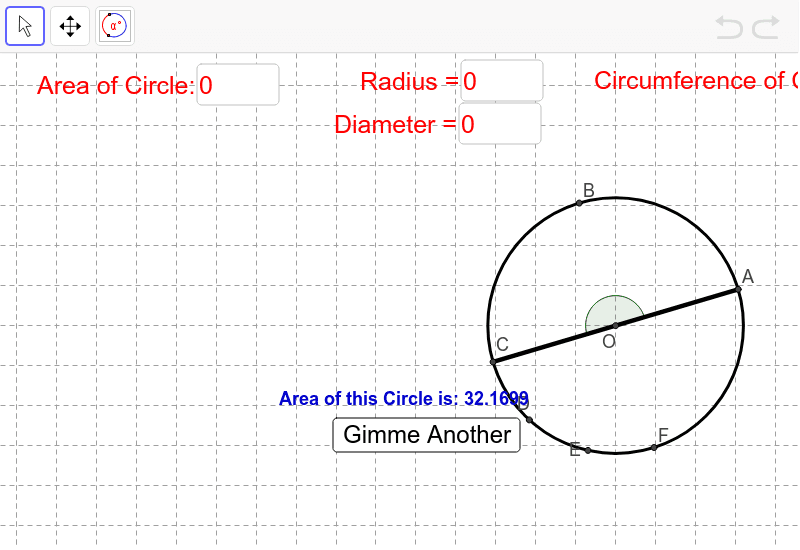
This example demonstrates how to calculate the radius, diameter, and circumference of a circle given its area. Key mathematical concepts include the area and circumference formulas of a circle. Using GeoGebra commands such as Circle, Circumference, and Area, the basic properties of a circle are visually demonstrated. Suitable for middle school and above students to learn about circle-related knowledge.
GeoGebra Commands & Parameters
Element(Dimension[Arc1Arc2Radius], 1) → NumberOfEquationsRandom(1, NumberOfEquations) → CircleCounterElement(Arc1Arc2Radius, CircleCounter) → targetCircleCoefRandom(-2, 2) → hTextfield(h) → inputBox1Random(-2, 2) → kTextfield(k) → inputBox2Textfield(r) → inputBox3Random(1, 4) → WhichPointElement(targetCircleCoef, 1) → Arc1Element(targetCircleCoef, 2) → Arc2Element(targetCircleCoef, 3) → radiusCircle(YourCenter, radius) → cMod(CircleCounter + 1, NumberOfEquations + 1) → counterPoint(c) → ARandom(1, (360 - Arc1 - Arc2) / 2) → MissingArcBetween1and2Rotate(A, α°, YourCenter) → CAngle(A, YourCenter, C) → AngleArc1ArcDeg(c, A, C) → d, text1Rotate(C, MissingArcBetween1and2°, YourCenter) → DAngle(C, YourCenter, D) → AngleArcCDRotate(D, Arc2°, YourCenter) → FAngle(D, YourCenter, F) → AngleArc2ArcDeg(c, D, F) → e, text3Segment(YourCenter, A) → aSegment(YourCenter, C) → bRotate(A, (Arc1 / 2)°, YourCenter) → BAngle(A, YourCenter, B) → εRotate(D, (Arc2 / 2)°, YourCenter) → EAngle(D, YourCenter, E) → ζCircumference(c) → CircCircumfArea(c) → CircAreaTextfield(YourArea) → inputBox4Textfield(YourCircumference) → inputBox5Textfield(YourSectorAOC) → inputBox6Textfield(YourArcACLength) → inputBox7Textfield(YourAngleAOC) → inputBox8Textfield(YourAngleFOD) → inputBox9Textfield(YourArcACdegree) → inputBox10Textfield(YourArcFDdegree) → inputBox11Textfield(YourRadius) → inputBox12Textfield(YourDiameter) → inputBox13
AI Drawing Prompt Reference
Draw a circle with a random center and radius, and display its area and circumference. Select two random points on the circle, connect them to the center to form line segments. Calculate the radius from the area of the circle and draw the corresponding diameter. Label the central angles and chords on the circle, and calculate the circumference. Display the calculation results and graphical properties beside, showing the relationship between the area, radius, diameter, and circumference of the circle.
The prompt above was compiled from the original drawing commands and is for reference only.