
Circle Angles and Tangents
Loading the math board and drawing, please wait…
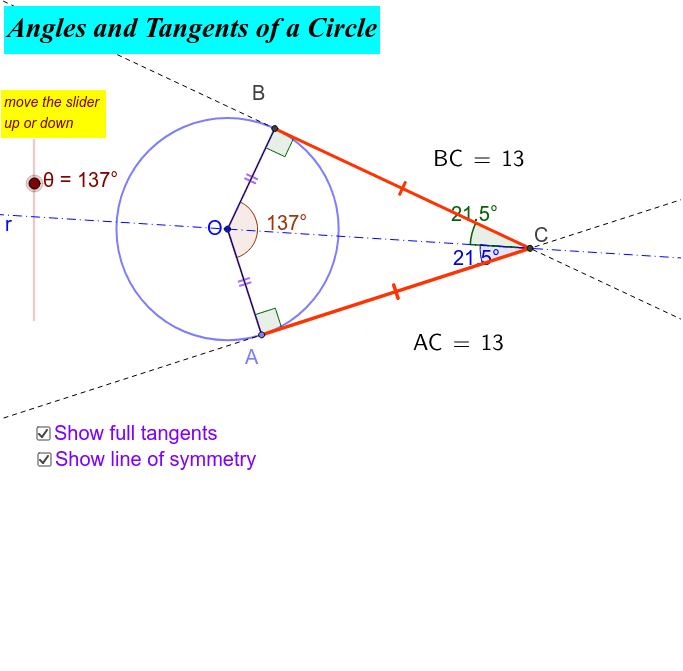
This example demonstrates the geometric relationships and properties of angles and tangents in a circle, including central angles, tangent properties, angle measurement, and geometric constructions. It uses GeoGebra commands like Circle, Point, Rotate, Segment, CircleArc, Angle, OrthogonalLine, Intersect, Distance, and Line. Suitable for high school mathematics education or for geometry enthusiasts studying circle properties and constructions.
GeoGebra Commands & Parameters
Circle((0, 0), 5) → cPoint(c) → ARotate(A, θ, O) → BSegment(B, A) → aCircleArc(O, B, A) → dSegment(B, O) → fSegment(O, A) → gAngle(A, O, B) → βCircleArc(O, A, B) → kSegment(O, A) → bSegment(O, B) → eOrthogonalLine(A, b) → mOrthogonalLine(B, e) → nIntersect(m, n) → CSegment(B, C) → pSegment(A, C) → qAngle(O, B, C) → δAngle(C, A, O) → εDistance(B, C) → distanceA'CDistance(C, A) → distanceCALine(O, C) → rAngle(O, C, A) → γAngle(B, C, O) → α
AI Drawing Prompt Reference
Draw a circle with radius 5 centered at the origin. Pick a point A on the circle and rotate it to get point B. Connect AB. Draw arc AB, and connect OB and OA. Measure the angle ∠AOB, draw arcs OA and AB. Draw perpendicular lines to OA and OB, intersecting at point C. Connect BC and AC. Measure angles ∠BOC and ∠AOC, and calculate the distances of BC and CA. Draw line OC and measure angles ∠AOC and ∠BOC.
The prompt above was compiled from the original drawing commands and is for reference only.