
Christmas Tree Geometry: Equilateral Triangles and Circles
Loading the math board and drawing, please wait…
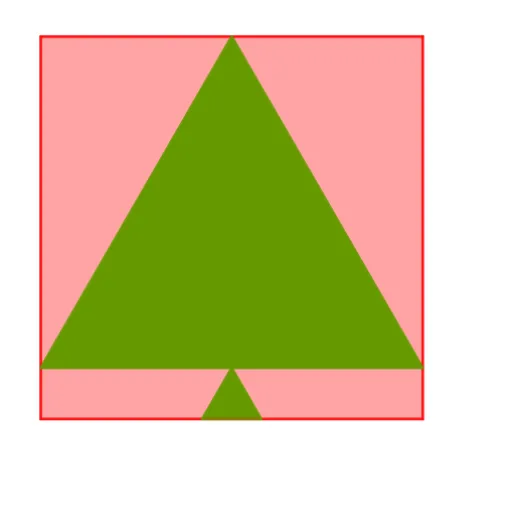
① This GeoGebra example constructs a Christmas tree shape using multiple equilateral triangles, circles, and line segments, demonstrating how geometric elements combine into a festive pattern. ② Core math concepts include properties of equilateral triangles, similar triangles, circle intersections, midpoints, polygon construction, and relationships among points, lines, and circles. ③ Construction highlights: from the summary, commands such as Point, Polygon, Midpoint, Circle, Intersect, and Line are used; objects include points A, B, polygon poly1, auxiliary lines f, g, h, i, points C, D, E, circle c, point F, polygon poly2, segments j, k, l, points G, H, segment m, points I, J, polygon poly3, and segments n, p, q plus point K, progressively building the tree crown and trunk. ④ Suitable for middle school and above for geometric construction practice, shape composition, and logical reasoning, also as a holiday-themed math activity to understand basic geometric objects and their interactions.
GeoGebra Commands & Parameters
Point(yAxis) → APoint(xAxis) → BPolygon(A, B, 4) → poly1, f, g, h, i, C, DMidpoint(D, C) → ECircle(E, 1) → cIntersect(c, g) → F,Polygon(F, E, 3) → poly2, j, k, l, GMidpoint(G, F) → HLine(H, j) → mIntersect(f, xAxis) → IIntersect(m, f) → JPolygon(J, H, 3) → poly3, n, p, q, K
AI Drawing Prompt Reference
Draw a Christmas tree using geometric shapes. Start with a square on the coordinate axes, using two points on the axes as its base. Mark the midpoint of the top side of the square, and draw a small circle centered at this midpoint. The circle intersects one side of the square at a point. Use this intersection point, the midpoint, and a vertex of the square to form an equilateral triangle, representing the first layer of the tree crown. Then take the midpoint of one side of this triangle, draw a line through it that intersects another side of the square. Finally, use this new intersection, the midpoint, and another point to form a second equilateral triangle, creating the upper crown. The final figure shows a square base with two stacked equilateral triangles, a circle, and auxiliary lines, forming a stylized Christmas tree.
The prompt above was compiled from the original drawing commands and is for reference only.