
Challenge 2a: Reflection in the line y = a
Loading the math board and drawing, please wait…
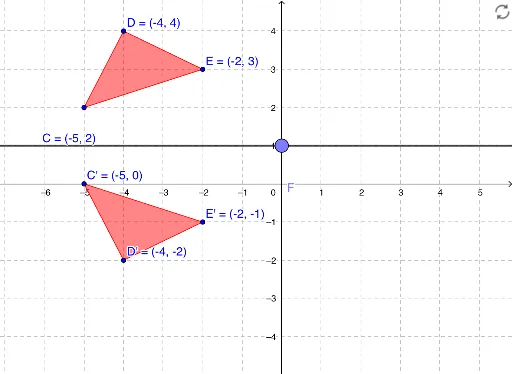
① This example demonstrates the mirror reflection of a polygon (rectangle) across a horizontal line y = a, showing both the original and reflected figures with corresponding vertices. ② The core mathematical concept is axial symmetry (reflection) in plane geometry, involving the reflection line, corresponding points, congruent figures, and coordinate relationships. ③ Construction highlights: using GeoGebra commands Point to create points A, B, C, D, E; Polygon to form rectangle poly1; OrthogonalLine to draw perpendicular auxiliary lines; and Mirror to reflect points, edges, and the whole polygon, producing images C', D', E', poly1', while keeping the reflection axis e and auxiliary lines c, d, f. ④ Suitable for middle or high school geometry classes, this interactive challenge helps students intuitively understand properties of reflection and explore how the reflected figure's position and coordinates change.
GeoGebra Commands & Parameters
Point(xAxis) → APoint(xAxis) → BPolygon(C, D, E) → poly1, e, c, dPoint(yAxis) → FOrthogonalLine(F, yAxis) → fMirror(C, f) → C'Mirror(D, f) → D'Mirror(E, f) → E'Polygon(C', D', E') → poly1', e', c', d'
AI Drawing Prompt Reference
Draw a rectangle ABCD, then choose a point F on the y-axis as the reflection axis, and draw a perpendicular line f from F to the y-axis. Reflect the vertices A, B, C, D of the rectangle ABCD across line f to get new vertices A', B', C', D', and then connect these vertices to form a new rectangle A'B'C'D'.
The prompt above was compiled from the original drawing commands and is for reference only.