
Centroid Coordinates Interactive Demonstration
Loading the math board and drawing, please wait…
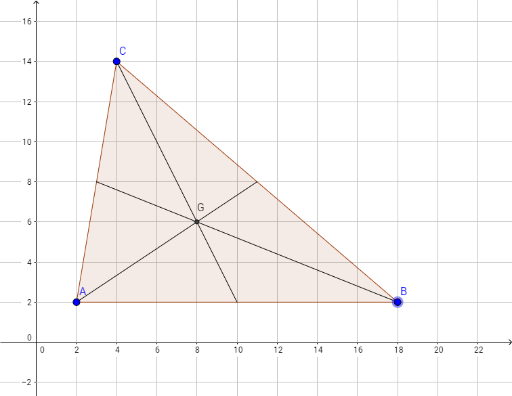
This GeoGebra example dynamically demonstrates the centroid of a triangle and its coordinate calculation. The core mathematical concept is the centroid theorem: the centroid divides each median in a 2:1 ratio, and its coordinates are the arithmetic mean of the three vertex coordinates. Construction steps include: using the Polygon command to create triangle poly1, the Midpoint command to generate side midpoints D, E, F, the Segment command to draw medians c, a, b from vertices to opposite midpoints, and the Intersect command to find the common point G of the three medians. Suitable for middle or high school geometry and coordinate geometry lessons, this interactive tool allows students to drag vertices A, B, C to observe how the centroid moves and verify the coordinate averaging property.
GeoGebra Commands & Parameters
Polygon(A, B, C) → poly1, c, a, bMidpoint(b) → DMidpoint(c) → EMidpoint(a) → FSegment(D, B) → fSegment(F, A) → gSegment(E, C) → hIntersect(g, h) → G