
Centroid Construction via Vectors (Example 7)
Loading the math board and drawing, please wait…
In collections
geometriadinamica.es
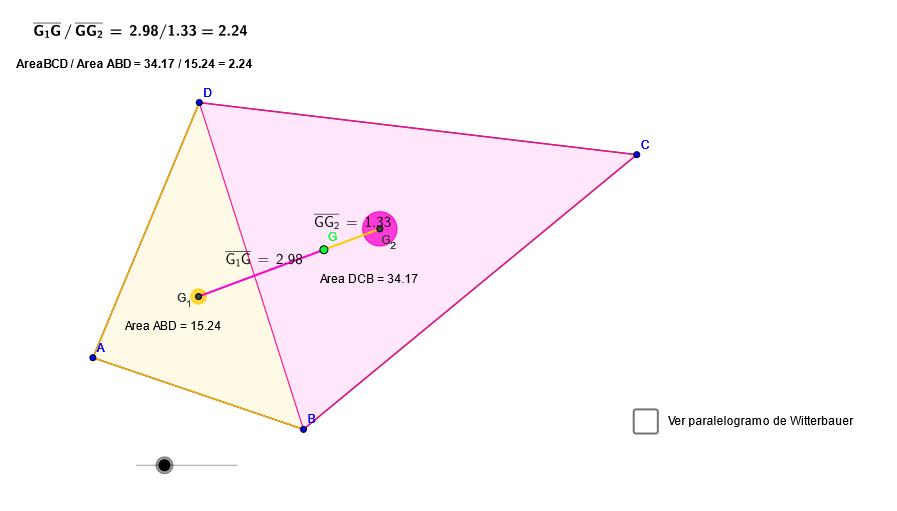
This GeoGebra example demonstrates how to construct and verify the centroid (center of gravity/center of mass) of a geometric configuration using geometric decomposition and vector relationships in a coordinate framework. The key math ideas are centroid theory, representing points with vectors and linear combinations, and using geometric measurements such as distances to confirm the constructed location. Construction highlights: Midpoint is used to create key midpoints; Line and Segment form auxiliary lines and structure edges; Intersect computes important intersection points; Polygon builds polygonal regions (poly1, poly2, poly3) and Circle introduces circular constraints when needed; Distance provides geometric checks between relevant points/objects. The build uses multiple labeled points (e.g., D, C, P, R, and others) and derived centroid-related points (such as E, F, and G_6) to assemble the final centroid position. Suitable for advanced middle school through early university, especially for lessons on coordinate geometry, vector methods, and geometric construction techniques.
GeoGebra Commands & Parameters
Midpoint(D, P) → RLine(P, O) → j_1Midpoint(O, B) → SMidpoint(N, D) → QLine(Q, R) → i_1Intersect(i_1, j_1) → WLine(M, N) → tIntersect(t, i_1) → VMidpoint(B, M) → TLine(S, T) → k_1Intersect(j_1, k_1) → ZSegment(V, Z) → m_1Intersect(t, k_1) → USegment(U, W) → l_1Polygon(A, B, C, D) → poly1, a, b, c, dPolygon(A, C, B) → poly2, b_1, a_1, c_1Polygon(A, D, C) → poly3, c_2, a_2, d_1Midpoint(a) → EMidpoint(b) → FSegment(A, F) → eSegment(C, E) → fIntersect(e, f) → G_6Midpoint(d) → G_5Midpoint(c) → HSegment(A, H) → gSegment(C, G_5) → hIntersect(g, h) → G_3Segment(G_6, G_3) → iPolygon(E, G_5, H, F) → poly4, e_1, g_1, h_1, f_1Segment(E, H) → jSegment(G_5, F) → kIntersect(j, k) → ISegment(B, D) → lSegment(B, G_5) → mSegment(D, E) → nSegment(D, F) → pSegment(B, H) → qIntersect(n, m) → G_1Intersect(p, q) → G_2Segment(G_1, G_2) → rIntersect(m_1, l_1) → GPolygon(U, V, W, Z) → poly5, u, v, w, zPolygon(A, B, D) → poly6, d_2, a_3, b_2Polygon(D, C, B) → poly7, b_3, d_3, c_3Segment(G_1, G) → sSegment(G, G_2) → n_1Distance(G_1, G) → distanciaG3GDistance(G, G_2) → distanciaGG4Circle(G_1, (o * poly6 / 25)) → c1Circle(G_2, (o * poly7 / 25)) → d1
AI Drawing Prompt Reference
Draw a vector-based centroid construction for a quadrilateral. Include quadrilateral ABCD with vertices labeled. Inside the quadrilateral, construct auxiliary lines using midpoints: find midpoints E on AB and F on AD, then draw segments AF and CE to intersect at G_6; find midpoints G_5 on CD and H on BC, then draw AH and CG_5 to intersect at G_3. Locate intersection points G_1 and G_2 near the diagonal intersection area, then connect these points with segments. Finally, find the centroid G as the intersection of two key segments. Fill the quadrilateral with three smaller triangles (ABC, ADC, ABD) to demonstrate geometric decomposition, and include distance measurements to verify the centroid's position relative to these regions.
The prompt above was compiled from the original drawing commands and is for reference only.