
Central Projection 3D Demo
Loading the math board and drawing, please wait…
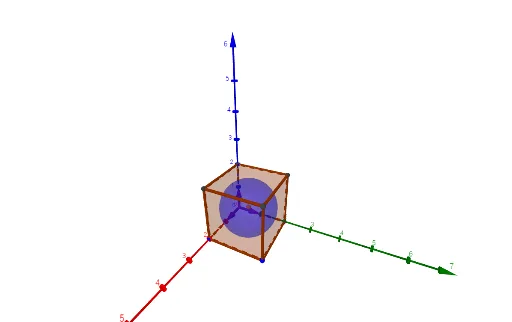
This example demonstrates central projection in 3D space, showing the interaction between light source, objects, and projection plane. It involves core math concepts like 3D vectors, geometric transformations, solid geometry, rotation, and integer arithmetic. Construction uses commands such as Sequence, Vector, Cube, Line, Intersect, OrthogonalLine, and Sphere. Suitable for high school students and math enthusiasts studying solid geometry and spatial transformations.
GeoGebra Commands & Parameters
Sequence(Line[(0, k, 0), (0, k, 1)], k, -15, 15, Gitterkonstante) → L_2Sequence(Line[(0, 0, k), (0, 1, k)], k, -10, 10, Gitterkonstante) → L_3Vector(O, E_1) → uVector(O, E_2) → vVector(O, E_3) → wCube(O, A, B) → a, C, FlächeBCGF, FlächeDEFG, KanteCO, KanteAO, KanteAB, KanteBC, KanteDO, KanteCG, KanteDG, KanteDE, D, KanteAE, KanteEF, KanteBF, KanteFG, E, F, G, FlächeABCO, FlächeCGDO, FlächeAEDO, FlächeABFELine(D, B) → f_1Line(G, A) → gIntersect(g, f_1) → MOrthogonalLine(M, FlächeABCO) → fIntersect(f, FlächeABCO) → HSphere(M, H) → b
AI Drawing Prompt Reference
Demonstrate central projection in 3D by drawing a cube with grid lines, a light source at one corner of the cube, and three lines from the source to the cube's vertices. Show the intersection of the cube with a projection plane, draw a perpendicular line from the intersection point to the cube's surface, and create a sphere centered on this line to illustrate the interaction between light, objects, and the projection plane.
The prompt above was compiled from the original drawing commands and is for reference only.