
Center of Rotation: Dynamic Demonstration of Geometric Transformation
Loading the math board and drawing, please wait…
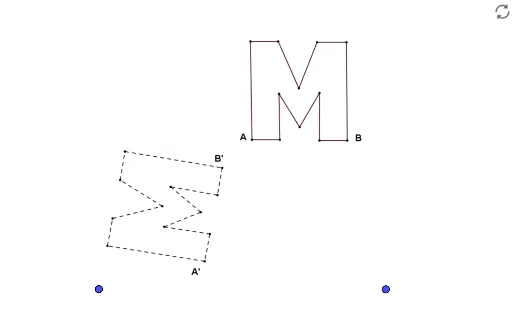
①This GeoGebra example dynamically demonstrates the rotation of a figure around a specified center point, showing the positional relationship before and after the rotation. ②The core mathematical concept is the rotation transformation in plane geometry, including the center of rotation, rotation angle, and direction, as well as the property that rotation preserves shape and size. ③Construction: Based on the summary, it uses points A, B, and an image object pic1. The rotation center is likely set to one of these points, and a rotation command or transformation tool is applied, possibly with a slider to control the angle for dynamic animation. ④It is suitable for middle school (upper grades) or high school geometry transformation lessons, both for teacher demonstrations and student self-exploration, helping to understand the geometric essence and coordinate changes of rotation.
GeoGebra Commands & Parameters
Point A(-1.604, -1.596)Point B(6.22, -1.6)
AI Drawing Prompt Reference
Create a dynamic geometric rotation demonstration: place two fixed points, one serving as the rotation center and the other as a reference. Around the center, rotate an arbitrary shape (like a polygon or image) by a specified angle, showing both the original and rotated positions simultaneously, distinguished by different colors or transparency. Include an adjustable angle slider to animate the rotation, clearly illustrating that the shape and size remain unchanged while only position and orientation vary.
The prompt above was compiled from the original drawing commands and is for reference only.