
Same-Side Exterior Angles: Quick Investigation
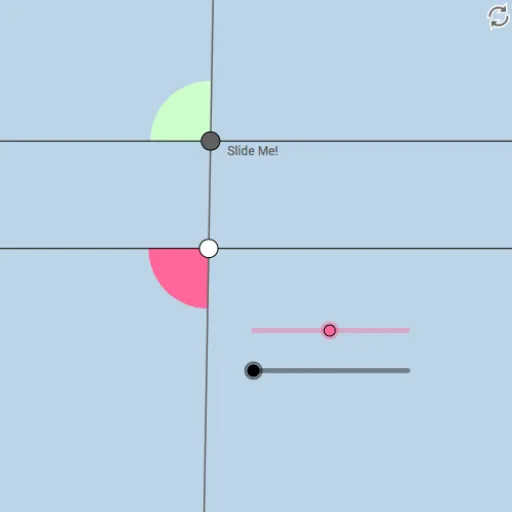
Loading the math board and drawing, please wait…
This interactive GeoGebra example demonstrates the relationship between same-side exterior angles formed when a transversal intersects two parallel lines. The core mathematical concept is the theorem that same-side exterior angles are supplementary, meaning their measures sum to 180 degrees. The construction uses commands such as Point, Line, Ray, Segment, Intersect, Angle, Circle, Rotate, and CircleSector to build the parallel lines, transversal, and angle markers. Users can drag points or use sliders to dynamically change the configuration and observe how the angles vary while maintaining the supplementary property. This resource is ideal for middle school geometry lessons on parallel lines and transversals, as well as for high school review or teacher demonstrations. It provides a hands-on way to explore angle relationships and verify the theorem visually.
GeoGebra Commands & Parameters
Point(f) → ACircle(A, 2) → cIntersect(c, f, 2) → BRotate(B, (a * π / 180), A) → B'Rotate(f, (b * π / 180), A) → f'Intersect(c, f', 2) → FRotate(F, (a * π / 180), A) → F'Angle(F, A, F') → αLine(A, F') → gIntersect(c, g, 1) → CRay(A, F') → hRay(A, C) → iIntersect(c, f', 1) → DRay(A, F) → jRay(A, C) → kRay(A, D) → lPoint(l) → EPoint(h) → GPoint(k) → HPoint(j) → ILine(G, j) → mCircle(G, 1) → dIntersect(d, m) → J, KIntersect(d, h) → L, MRay(G, K) → nRay(G, J) → pPoint(n) → OPoint(p) → PIntersect(d, h, 2) → QRay(G, Q) → qSegment(A, G) → rPoint(q) → NCircle(G, 1.5) → c_1Circle(A, 1.5) → d_1Intersect(c_1, n, 1) → RIntersect(c_1, q, 1) → SIntersect(c_1, p, 1) → TIntersect(c_1, r, 1) → UIntersect(d_1, j, 1) → VIntersect(d_1, r, 1) → WIntersect(d_1, l) → Z,Intersect(d_1, k, 1) → A_1CircleSector(G, R, S) → e_1CircleSector(G, S, T) → f_1CircleSector(G, T, U) → g_1CircleSector(G, U, R) → h_1CircleSector(A, V, W) → k_1CircleSector(A, W, Z) → p_1CircleSector(A, Z, A_1) → q_1CircleSector(A, A_1, V) → r_1
AI Drawing Prompt Reference
Draw two parallel lines and a transversal intersecting them. Mark a point outside the lines, draw a circle centered at this point intersecting the transversal at two points. Rotate one intersection point around the center by a certain angle to get another intersection point. Connect the center and the rotated point. Draw a circle centered at the center intersecting the line, getting two intersection points. Connect these two points. Draw another circle centered at the center intersecting the line segment, getting two intersection points. Connect these two points. Draw two sectors centered at the center with the two intersection points as start and end points. Draw two more sectors centered at the center with the two intersection points as start and end points.
The prompt above was compiled from the original drawing commands and is for reference only.