
Writing Linear Equations in Slope-Intercept Form
Loading the math board and drawing, please wait…
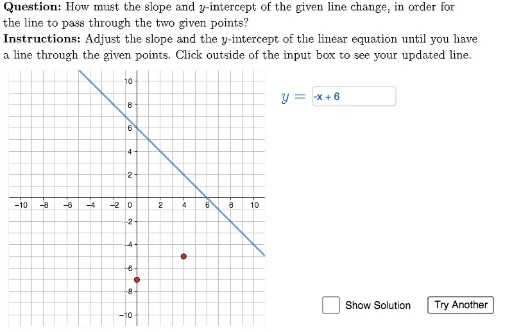
This interactive GeoGebra example demonstrates how to determine the equation of a line in slope-intercept form (y = mx + b) given two points. The core mathematical concepts include calculating slope, finding the y-intercept, and understanding the standard form of linear equations. The construction uses GeoGebra commands such as Polygon to create coordinate grids, Textfield for user input, Element and Intersect to handle points and line intersections, and LaTeX for displaying formulas. Multiple objects like QUESTION, INSTRUCTIONS, TEXT, HowDidIDo, isChecked, and questionList manage a randomized question system with instant feedback. Suitable for middle school to high school students learning linear functions, this example serves as both a classroom demonstration tool and a self-paced practice exercise, offering repeated problem-solving opportunities with varying point pairs.
GeoGebra Commands & Parameters
Polygon({(-11, -11), (-11, 11), (11, 11), (11, -11)}) → viewBoxLaTeX((((("\text{" * QUESTION) * "\\") * INSTRUCTIONS) * "}")) → TEXTElement(questionList, questionListIndex) → questionNumIntersect(B2, x = 0) → C2Intersect(B3, x = 0) → C3Intersect(B4, x = 0) → C4Intersect(B5, x = 0) → C5Intersect(B6, x = 0) → C6Intersect(B7, x = 0) → C7Element(A2:A7, questionNum) → givenFunctionElement(B2:B7, questionNum) → targetFunctionElement(C2:C7, questionNum) → targetPoint1Element(D2:D7, questionNum) → targetPoint2LaTeX("y=") → equationLabelTextfield(textUserFunction) → ansBoxEquationLaTeX(("y=" * targetFunction)) → solution