
Cardioids in a Golden Spiral
Loading the math board and drawing, please wait…
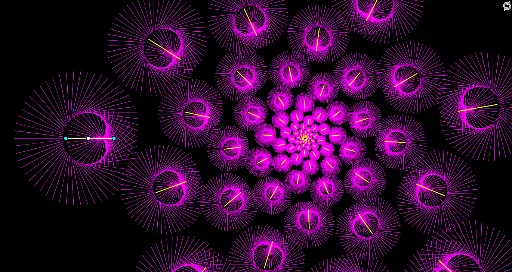
This example demonstrates the transformation of cardioids within a golden spiral. Key mathematical concepts include transformation, rotation, and dilation. Using GeoGebra commands such as Point, Rotate, Segment, and Sequence, the dynamic changes of cardioids within the golden spiral can be observed. Suitable for high school mathematics education, particularly in coordinate geometry and transformation geometry.
GeoGebra Commands & Parameters
Point(xAxis) → DRotate(D + (r, 0), (anim * 360°), D) → BRotate(B + (-1.5, 0), ((2 * anim) * 360°), B) → CSegment(A, B) → fSequence(Rotate[Segment[Dilate[A, fact^(k)], Dilate[B, fact^(k)]], (k * α)], k, 0, 99) → l1Sequence(Rotate[Segment[Dilate[A, fact^(k)], Dilate[B, fact^(k)]], (k * α)], k, 0, 99) → l2
AI Drawing Prompt Reference
Draw multiple cardioid shapes within a golden spiral, showing dynamic transformations through rotation and scaling. Start by placing a point on the x-axis, then rotate and scale it to generate several cardioid shapes arranged along the golden spiral. The continuous rotation and scaling create a dynamic transformation effect.
The prompt above was compiled from the original drawing commands and is for reference only.