
Carbon Fiber Volume: Intuitive Introduction
Loading the math board and drawing, please wait…
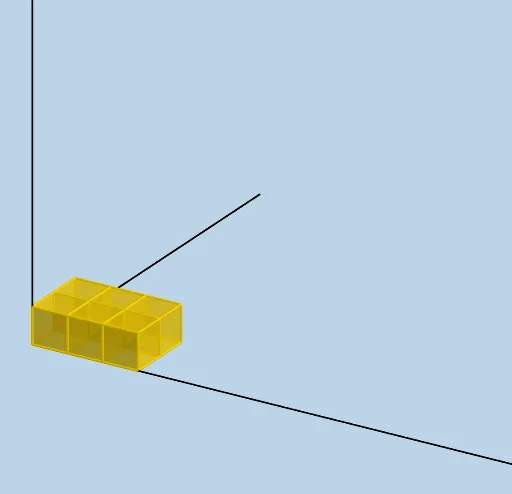
This example provides an intuitive introduction to volume, focusing on solid geometry, particularly the volume of a cylinder through parametric curves and geometric construction. It uses commands like Ray, LENGTH, WIDTH, HEIGHT, and Sequence to construct the demonstration. Suitable for high school mathematics education and learning.
GeoGebra Commands & Parameters
Sequence(Cube[(i, 0, 0), (i + 1, 0, 0), Point[Circle[(i + 1, 0, 0), Distance[(i, 0, 0), (i + 1, 0, 0)], Segment[(i, 0, 0), (i + 1, 0, 0)]]]], i, 0, LENGTH - 1, 1) → L_1Sequence(Cube[(1, i, 0), (1, i + 1, 0), Point[Circle[(1, i + 1, 0), Distance[(1, i, 0), (1, i + 1, 0)], Segment[(1, i, 0), (1, i + 1, 0)]]]], i, 1, WIDTH - 1, 1) → L_2Sequence(Sequence[Translate[Element[L_1, i], Vector[(0, j)]], j, 1, WIDTH - 1, 1], i, 2, LENGTH, 1) → L_4Sequence(Translate[L_4, Vector[(0, 0, i)]], i, 1, HEIGHT - 1, 1) → L_5Sequence(Translate[L_1, Vector[(0, 0, i)]], i, 1, HEIGHT - 1, 1) → L_6Sequence(Translate[L_2, Vector[(0, 0, i)]], i, 1, HEIGHT - 1, 1) → L_7Ray((0, 0, 0), (1, 0, 0)) → fRay((0, 0, 0), (0, 1, 0)) → gRay((0, 0, 0), (0, 0, 1)) → h
AI Drawing Prompt Reference
Create a visual representation of the volume of a cylinder using parametric curves and geometric construction. Start by drawing two rays representing the x-axis and y-axis. Construct a cube and then generate multiple cubes by translating it along the x-axis and y-axis. Finally, stack these cubes by translating them along the z-axis in layers to form the intuitive demonstration of a cylinder's volume.
The prompt above was compiled from the original drawing commands and is for reference only.