
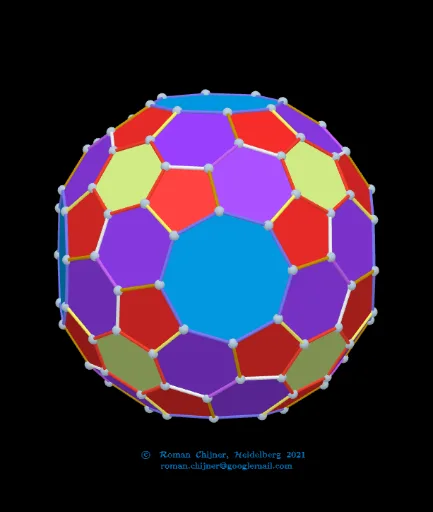
Canonical Truncated Snub Cube (laevo) and Its Dual: Edge/Face Coloring
Loading the math board and drawing, please wait…
This example visualizes the canonical truncated snub cube (laevo) together with its dual polyhedron, focusing on how edges and faces can be colored to reveal the combinatorial correspondences implied by duality. It highlights key ideas from solid geometry: vertex–edge–face structure of polyhedra, the notion of a dual polyhedron, and geometry-driven classification for consistent styling. The construction uses GeoGebra commands and workflow reflected in the model: Sequence to generate index/parameter lists; If for conditional logic; Sort, First, and KeepIf to select and filter elements; Sphere and Circle to set spherical/circular reference geometry; PointIn to test membership of points in regions; Angle and Segment to measure angles and form edges. Textfield, TableText, UnicodeToLetter, and Text objects are used for labeling and displaying structured information. Additional computed quantities such as Vol, Vold, Vol_{sphere}, Vol_r, and Vold_r support interpreting geometric measures within the visualization. Suitable for advanced high school through early university, especially for teaching/learning polyhedral duality and geometry visualization with GeoGebra.
GeoGebra Commands & Parameters
Sequence(((zoom * Element[Element[A00d, i], 1]), (zoom * Element[Element[A00d, i], 2]), (zoom * Element[Element[A00d, i], 3])), i, 1, Length[A00d]) → A0dSphere(O, r_o) → sp02dTextfield(R1sphere) → InputBox5Sphere(O, R1sphere) → sp01Textfield(r_o) → InputBox6Textfield(jarc) → InputBox8Textfield(jarc_d) → InputBox9Textfield(f_{Poly}) → InputBox11Textfield(k) → InputBox15Textfield(k_d) → InputBox14TableText({Append["i", 1…Length[mm5a]], Append["\fgcolor{orange}{n}", mm5a], Append["\fgcolor{orange}{N}", mm7a], Append["\fgcolor{#007FFF}{n/dual}", mm5ad], Append["\fgcolor{#007FFF}{N}", mm7ad]}, "hr") → text24Textfield(iseg) → InputBox17Textfield(f_{Poly}d) → InputBox18Textfield(isegd) → InputBox19UnicodeToLetter(34) → u34TableText({Append["i", 1…Max[Length[Segn], Length[Segnd]]], Append["\fgcolor{orange}{s_i}", Segn / Segments_o1], Append["\fgcolor{orange}{N}", lLength], Append["\fgcolor{#007FFF}{s_id}", Segnd / Segments_o1d], Append["\fgcolor{#007FFF}{N}", lLengthd]}, "hr") → text23Textfield(n_3) → InputBox20If(n_3 ≟ 0, "", Text["" + n_3]) → txt_3Textfield(nd_3) → InputBox21If(nd_3 ≟ 0, "", Text["" + nd_3]) → txtd_3Circle(A_{farbe}, rfabe) → farbekreisPointIn(farbekreis) → AAngle(A) → αSegment(C, D) → hSequence(((zoom * Element[Element[A00, i], 1]), (zoom * Element[Element[A00, i], 2]), (zoom * Element[Element[A00, i], 3])), i, 1, Length[A00]) → A0Sort(Sequence[Segment[Element[A0d, Element[Element[nomd, i], 1]], Element[A0d, Element[Element[nomd, i], 2]]], i, 1, Length[nomd]]) → SegmentsdFirst(Segmentsd, id_s) → Segmentsd_oSort(Sequence[Segment[Element[A0, Element[Element[nom, i], 1]], Element[A0, Element[Element[nom, i], 2]]], i, 1, Length[nom]]) → SegmentsFirst(Segments, i_s) → Segments_oKeepIf(round((x * 10^(k))) / 10^(k) ≟ Element[Segn, 1], Segments) → la1KeepIf(round((x * 10^(k))) / 10^(k) ≟ Element[Segn, 2], Segments) → la2KeepIf(round((x * 10^(k))) / 10^(k) ≟ Element[Segn, 3], Segments) → la3KeepIf(round((x * 10^(k))) / 10^(k) ≟ Element[Segn, 4], Segments) → la4KeepIf(round((x * 10^(k))) / 10^(k) ≟ Element[Segn, 5], Segments) → la5KeepIf(round((x * 10^(k))) / 10^(k) ≟ Element[Segn, 6], Segments) → la6KeepIf(round((x * 10^(k))) / 10^(k) ≟ Element[Segn, 7], Segments) → la7KeepIf(round((x * 10^(k))) / 10^(k) ≟ Element[Segn, 8], Segments) → la8KeepIf(round((x * 10^(k))) / 10^(k) ≟ Element[Segn, 9], Segments) → la9KeepIf(round((x * 10^(k))) / 10^(k) ≟ Element[Segn, 10], Segments) → la10Sequence(Polygon[Sequence[A0(mm6(1, f, k)), k, 1, Length[mm6(1, 1)]]], f, 1, Length[mm6(1)]) → poly_{5}Sequence(Polygon[Sequence[A0(mm6(2, f, k)), k, 1, Length[mm6(2, 1)]]], f, 1, Length[mm6(2)]) → poly_{6}Sequence(Polygon[Sequence[A0(mm6(3, f, k)), k, 1, Length[mm6(3, 1)]]], f, 1, Length[mm6(3)]) → poly_{8}KeepIf(round((A * 10^(k))) / 10^(k) ≟ 4.376011, A, poly_{6}) → poly_{6}1KeepIf(round((A * 10^(k))) / 10^(k) ≟ 4.97852, A, poly_{6}) → poly_{6}2KeepIf(round((x * 10^(k))) / 10^(k) ≟ Element[Segnd, 1], Segmentsd) → lad1KeepIf(round((x * 10^(k))) / 10^(k) ≟ Element[Segnd, 2], Segmentsd) → lad2KeepIf(round((x * 10^(k))) / 10^(k) ≟ Element[Segnd, 3], Segmentsd) → lad3KeepIf(round((x * 10^(k))) / 10^(k) ≟ Element[Segnd, 4], Segmentsd) → lad4KeepIf(round((x * 10^(k))) / 10^(k) ≟ Element[Segnd, 5], Segmentsd) → lad5KeepIf(round((x * 10^(k))) / 10^(k) ≟ Element[Segnd, 6], Segmentsd) → lad6KeepIf(round((x * 10^(k))) / 10^(k) ≟ Element[Segnd, 7], Segmentsd) → lad7KeepIf(round((x * 10^(k))) / 10^(k) ≟ Element[Segnd, 8], Segmentsd) → lad8Sequence(Polygon[Element[A0d, Element[Element[mm1d, f], 1]], Element[A0d, Element[Element[mm1d, f], 2]], Element[A0d, Element[Element[mm1d, f], 3]]], f, 1, Length[mm1d]) → polyd_{3}KeepIf(round((x * 10^(k))) / 10^(k) ≟ Element[poly_{3}Sd, 1], polyd_{3}) → polyd_{3}1KeepIf(round((x * 10^(k))) / 10^(k) ≟ Element[poly_{3}Sd, 2], polyd_{3}) → polyd_{3}2KeepIf(round((x * 10^(k))) / 10^(k) ≟ Element[poly_{3}Sd, 3], polyd_{3}) → polyd_{3}3KeepIf(round((x * 10^(k))) / 10^(k) ≟ Element[poly_{3}Sd, 4], polyd_{3}) → polyd_{3}4KeepIf(round((x * 10^(k))) / 10^(k) ≟ Element[poly_{3}Sd, 5], polyd_{3}) → polyd_{3}5
AI Drawing Prompt Reference
Create a single visualization of the canonical truncated snub cube (laevo) together with its dual polyhedron, emphasizing the combinatorial correspondence implied by duality via edge/face coloring. Start by setting spherical or circular reference geometry using user-provided radius inputs, then generate the polyhedron’s vertices, edges, and polygonal faces. Use indexed parameter lists to select and sort segments and faces, and apply numeric rounding/threshold conditions to keep only the relevant faces and edge segments. Build face polygons from the selected vertex sequences and create the highlighted edge sets from the filtered segments. Display a structured color key using styled text so that orange denotes n and blue denotes n/dual, and add table-like labels for indices and their dual counterparts. Include angle and segment measurements to support the shown geometric relationships.
The prompt above was compiled from the original drawing commands and is for reference only.