
Calculating the Area of a Parallelogram
Loading the math board and drawing, please wait…
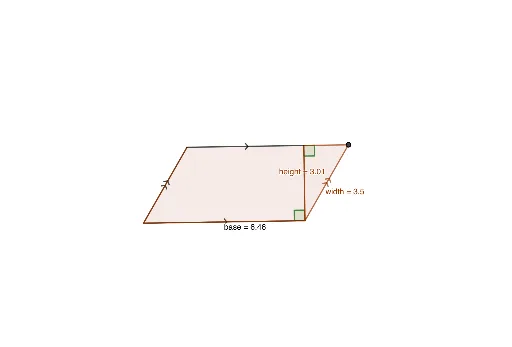
This example demonstrates how to calculate the area of a parallelogram by constructing its height and base. Key math concepts include parallelograms, area formulas, vectors, and geometric constructions. It utilizes commands like Segment, Line, Intersect, OrthogonalLine, Polygon, Point, Vector, Translate, and Angle from GeoGebra. Suitable for middle school students and above to understand area calculation methods and geometric interpretations of integral concepts in calculus.
GeoGebra Commands & Parameters
Segment(A, B) → baseSegment(A, C) → gLine(C, base) → hLine(B, g) → iIntersect(h, i) → DOrthogonalLine(B, base) → jIntersect(h, j) → EPolygon(E, B, D) → t1, d, e, bSegment(D, C) → kPoint(k) → FVector(D, F) → uTranslate(E, u) → E'Translate(B, u) → B'Translate(D, u) → D'Polygon(E', B', D') → t1', height, width, b'Polygon(A, B, E, C) → q1, a, b_1, e_1, cSegment(C, E) → lAngle(E, B, A) → αAngle(D', E', B') → β
AI Drawing Prompt Reference
Draw a parallelogram with a base and one side. From one endpoint of the base, construct a perpendicular line to the base, intersecting a line parallel to the side, forming the height. Highlight the parallelogram and the right triangle inside it. Then translate this triangle along the side direction to create a congruent triangle, and mark two corresponding angles to show the base-times-height area relationship.
The prompt above was compiled from the original drawing commands and is for reference only.