
Calculating Area of a Parallelogram by Mrs. Waterman
Loading the math board and drawing, please wait…
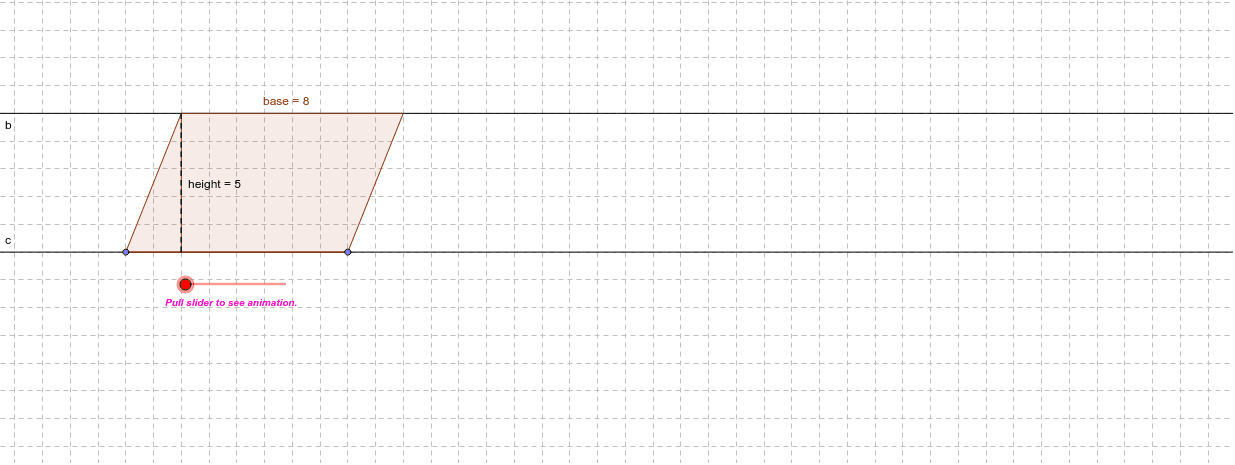
This example demonstrates how to calculate the area of a parallelogram by moving parts of the shape. Core math concepts include parallelogram, area calculation, vectors, and geometric transformations. GeoGebra commands and objects used in construction are Point, OrthogonalLine, Intersect, Angle, Rotate, Line, Polygon, Distance, Vector, Translate, and If. Suitable for middle school and above students to understand the geometric meaning of the parallelogram area formula and the application of vectors in geometry.
GeoGebra Commands & Parameters
Point(c) → BPoint(b) → DOrthogonalLine(D, c) → dIntersect(c, d) → GPoint(c) → APoint(c) → CAngle(B, A, D) → αRotate(C, α, B) → EAngle(C, B, E) → βLine(B, E) → aIntersect(b, a) → FPolygon(D, A, G) → P, g, d_1, a_1Polygon(G, B, F, D) → Q, g_1, b_1, base, d_2Distance(g, g_1) → hVector((((d_1 + g_1) * (1 - ttt)), 0)) → uTranslate(D, u) → D'Translate(A, u) → A'Translate(G, u) → G'Polygon(D', A', G') → P', g', d', heightIf(e ≟ 100, AnchorPoint) → Showanswer
AI Drawing Prompt Reference
Draw a parallelogram to demonstrate area calculation by moving its parts. Start by drawing two parallel lines and finding their intersection point. Rotate one side based on another to form the parallelogram. Use vector translation to move the parallelogram along the height and compare the areas. Finally, show the area formula and the application of vectors in geometry.
The prompt above was compiled from the original drawing commands and is for reference only.