
Calculating Actual Area Using a Scaled Drawing
Loading the math board and drawing, please wait…
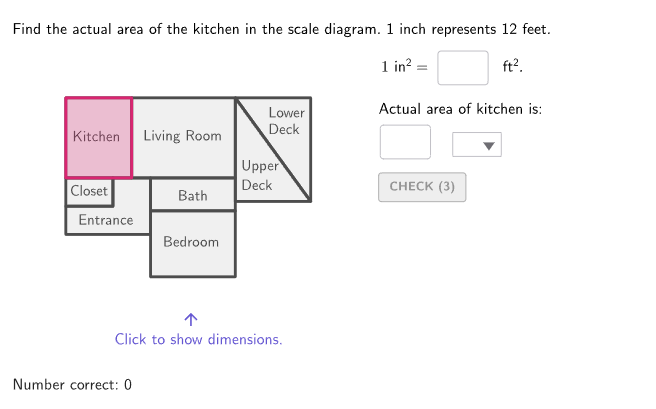
This example demonstrates how to calculate the actual area of a room using a scaled drawing. The key mathematical concepts involve scale, area calculation, and geometric construction. The construction uses GeoGebra commands like RandomUniform, Shuffle, and Polygon to create scaled models and compute actual areas. It is suitable for students in grades 6-8 for measurement and area estimation practice.
GeoGebra Commands & Parameters
RandomUniform(1, 7.999, 100) → randoms, {1.2111458055099855, 3.8089325707464563, 5.1151894953811325, 1.8012129080393011, 4.290719252613236, 7.269918569276233, 4.994934921167073, 2.465121025524579, 3.5989161314566225, 3.6597041878168883, 5.430573187771517, 6.459777621688009, 3.1371746824825455, 7.5234714341842155, 5.877088244490722, 7.142048134586424, 4.215348627598898, 2.1981203080871046, 6.736375247706555, 5.287027526045911, 6.356781347576113, 4.981015894679816, 5.1933120944582605, 3.44841019938957, 5.849167893295147, 3.450596270021063, 2.7008555723330945, 4.399712059010753, 7.318376266752407, 1.9097951062554774, 7.698504481965493, 2.6898631942030624, 1.483741288134305, 4.590544176434216, 7.531689113303022, 1.9332366424994396, 4.974170082347882, 4.550149133936972, 5.372820879999847, 1.278441011306365, 3.8306849319181615, 6.242082715575146, 2.2948830689395523, 1.5151921101156431, 5.947781646332657, 2.523707154517797, 7.407563231088848, 6.5382763593972015, 3.411215543299439, 3.3216234450002617, 3.245009817785751, 5.354041718939687, 6.254514152936212, 1.4077502182822261, 7.289349118094225, 6.488993751731399, 6.784680454825646, 7.624860515743089, 1.7611248381174593, 3.5929280132294883, 7.14218637397675, 6.580146091435655, 1.3998087455003607, 6.116611082620962, 7.316451088422276, 1.138440214593607, 3.164493264391668, 6.324316735676298, 2.3075718369986786, 5.168011585383606, 7.321807613005595, 2.42753996725284, 1.590112489798361, 7.764339752879986, 1.4999925000810712, 5.43394041903031, 1.4752592417187615, 1.682001026014297, 3.796936948877444, 3.2980272360219507, 5.341633319315523, 3.96172964585027, 2.073816050117621, 7.1562580715406785, 3.097489927242415, 3.690875382633696, 2.987771192838805, 7.908124473104278, 3.5459486370704725, 6.472850414711692, 2.3188465660085607, 5.012395622742947, 5.658282191727563, 2.6197550378769026, 5.514137881182875, 1.2800267910914782, 2.0031396189990116, 5.145178216158226, 4.285820085904344, 2.5172800492153193}Shuffle(Sequence[1, 7]) → shuffledIndices, {1, 4, 3, 5, 7, 6, 2}Shuffle({4, 5, 6, 7, 8, 9, 10, 11, 12}) → randomList2, {12, 10, 8, 4, 6, 7, 11, 9, 5}Zip((("$\text{" * A) * " }$"), A, {"\phantom{ft^2}", "ft^2", "in^2"}) → selectUnitsIf(caseNum ≟ 3, {1, 2, 2, 6, 6, 9, 10}, {1, 2, 3, 6, 8, 9, 10}) → roomIndexOptionsElement({CellRange(B2,K2,"polygon"), CellRange(B4,K4,"polygon"), CellRange(B6,K6,"polygon")}, caseNum) → currentPlanElement(roomIndexOptions, shuffledIndices(Mod[countQuestion, Length[shuffledIndices]] + 1)) → currentRoomElement(currentPlan, currentRoom) → pulsinghighlightRoomElement({CellRange(B13,K13,"numeric"), CellRange(B14,K14,"numeric"), CellRange(B15,K15,"numeric")}, caseNum) → currentHeightIndicesElement({CellRange(B9,K9,"list"), CellRange(B10,K10,"list"), CellRange(B11,K11,"list")}, caseNum) → currentBaseIndicesElement(randomList2, Mod[countQuestion, Length[randomList2]] + 1) → scaleFeetElement({CellRange(B3,K3,"list"), CellRange(B5,K5,"list"), CellRange(B7,K7,"list")}, caseNum) → currentOffsetsElement(currentOffsets, currentRoom) → measureOffsetsIf(Defined[Vertex[pulsinghighlightRoom, 4]], 4, 3) → numVerticesSequence(Vertex[pulsinghighlightRoom, A], A, 1, numVertices) → verticesHighlightSequence(Segment[verticesHighlight(A) + measureOffsets(A), verticesHighlight(Mod[A, numVertices] + 1) + measureOffsets(A)], A, 1, numVertices) → measureSegmentsElement(currentBaseIndices, currentRoom) → baseIndicesElement(currentHeightIndices, currentRoom) → heightIndexZip(round(((A * 1 / scaleFeet) * 2), 1), A, measureSegments) → measureInchesIf(currentRoom < 9, (measureInches(baseIndices(1)) * measureInches(heightIndex)), If[caseNum ≟ 1, (measureInches(baseIndices(1)) * measureInches(heightIndex) / 2), ((measureInches(baseIndices(1)) + measureInches(baseIndices(2))) / 2 * measureInches(heightIndex))]) → areaInchesElement(randomList2, Mod[countQuestion, 15] + 1) → randomNum2Element(roomIndexOptions, Mod[countQuestion, 20] + 1) → randomNum1Textfield(inputScaleSquareFeet) → InputBox2Polygon(Zip[PixelsToPoint[Corner[1], Corner[3], Corner[5], A], A, {(pixelsLeft, pixelsTop), (pixelsLeft, y(Corner[5]) - pixelsBottom), Corner[5] - (pixelsRight, pixelsBottom), (x(Corner[5]) - pixelsRight, pixelsTop)}]) → borderBoxCorner(5) → layoutAppSizeboxTool(7, 8.5, A2 + (0, 10.5)) → B2boxTool(11, 8.5, A2 + (7, 10.5)) → C2boxTool(9, 3.5, A2 + (9, 7)) → D2boxTool(0, 0, A2) → E2boxTool(9, 4.5, A2) → F2boxTool(9, 7, A2 + (9, 0)) → G2Polygon(Zip[A2 + (0, 4.5) + K, K, {(0, 0), (0, 3), (5, 3), (5, 6), (9, 6), (9, 0)}]) → H2Element(currentPlan, 1) → kitchenElement(currentPlan, 2) → livingElement(currentPlan, 4) → ensuiteElement(currentPlan, 8) → closetElement(currentPlan, 5) → denElement(currentPlan, 6) → bedroomElement(currentPlan, 7) → entranceboxTool(9.5, 5, A4 + (10.5, 0)) → B4boxTool(10.5, 14, A4 + (9.5, 5)) → C4boxTool(9.5, 5, A4 + (0, 5)) → H4boxTool(9.5, 9, A4 + (0, 10)) → G4boxTool(6, 5, A4) → D4boxTool(0, 0, A4) → F4Element(currentPlan, 9) → upperDeckElement(currentPlan, 3) → bathTextfield(inputActual) → InputBox3If(showDimensions, {192 / 255, 192 / 255, 192 / 255}, {77 / 255, 77 / 255, 77 / 255}) → planColorboxTool(5, 3, A2 + (0, 7.5)) → I2boxTool(4.5, 5, A4 + (6, 0)) → I4If(doubleInchScale, 2, 1) → showScaleInchesIf(doubleInchScale, (2 * scaleFeet), scaleFeet) → showScaleFeetPolygon({A2 + (18, 8), A2 + (26, 8), A2 + (18, 19)}) → J2Polygon({A2 + (26, 8), A2 + (26, 19), A2 + (18, 19)}) → K2Polygon({A4 + (20, 9), A4 + (25, 5), A4 + (25, 19), A4 + (20, 19)}) → J4Polygon({A4 + (20, 0), A4 + (25, 0), A4 + (25, 5), A4 + (20, 9)}) → K4Element(currentPlan, 10) → lowerDeckboxTool(6, 8, A6 + (10, 0)) → B6boxTool(13, 10, A6 + (3, 8)) → C6boxTool(8, 4.5, A6 + (16, 0)) → D6boxTool(0, 0, A6) → E6boxTool(8, 6.5, A6 + (16, 11.5)) → F6boxTool(10, 8, A6) → G6Polygon(Zip[A6 + (16, 4.5) + K, K, {(0, 0), (0, 7), (7, 7), (7, 2), (3, 2), (3, 0)}]) → H6boxTool(5, 2, A6 + (19, 4.5)) → I6Polygon({A6 + (0, 8), A6 + (3, 8), A6 + (3, 18), A6 + (-5, 18)}) → J6Polygon({A6 + (-5, 0), A6, A6 + (0, 8), A6 + (-5, 18)}) → K6boxTool(0, 0, A4) → E4Sequence(If[displayFractions, FractionText[measureInches(A)], ("\vphantom{\frac{1}{2}}" * measureInches(A))], A, 1, numVertices) → allMeasuresLatexZip(Text[(("" * A) * "~in"), Midpoint[B] - (2.8 * UnitOrthogonalVector[B]), false, true, 0, 0], A, allMeasuresLatex, B, measureSegments) → measureLabels
AI Drawing Prompt Reference
Draw a scaled drawing of a room with multiple room outlines, such as kitchen, living room, and bedroom. Include a boundary box and measurement segments, with scale ratio and actual area labels. Construction order: draw room outlines first, then add boundary box and measurement segments, finally calculate and label the area.
The prompt above was compiled from the original drawing commands and is for reference only.