
Butterbaugh 3D Cone
Loading the math board and drawing, please wait…
In collections
Volume and 3D Geometry Book
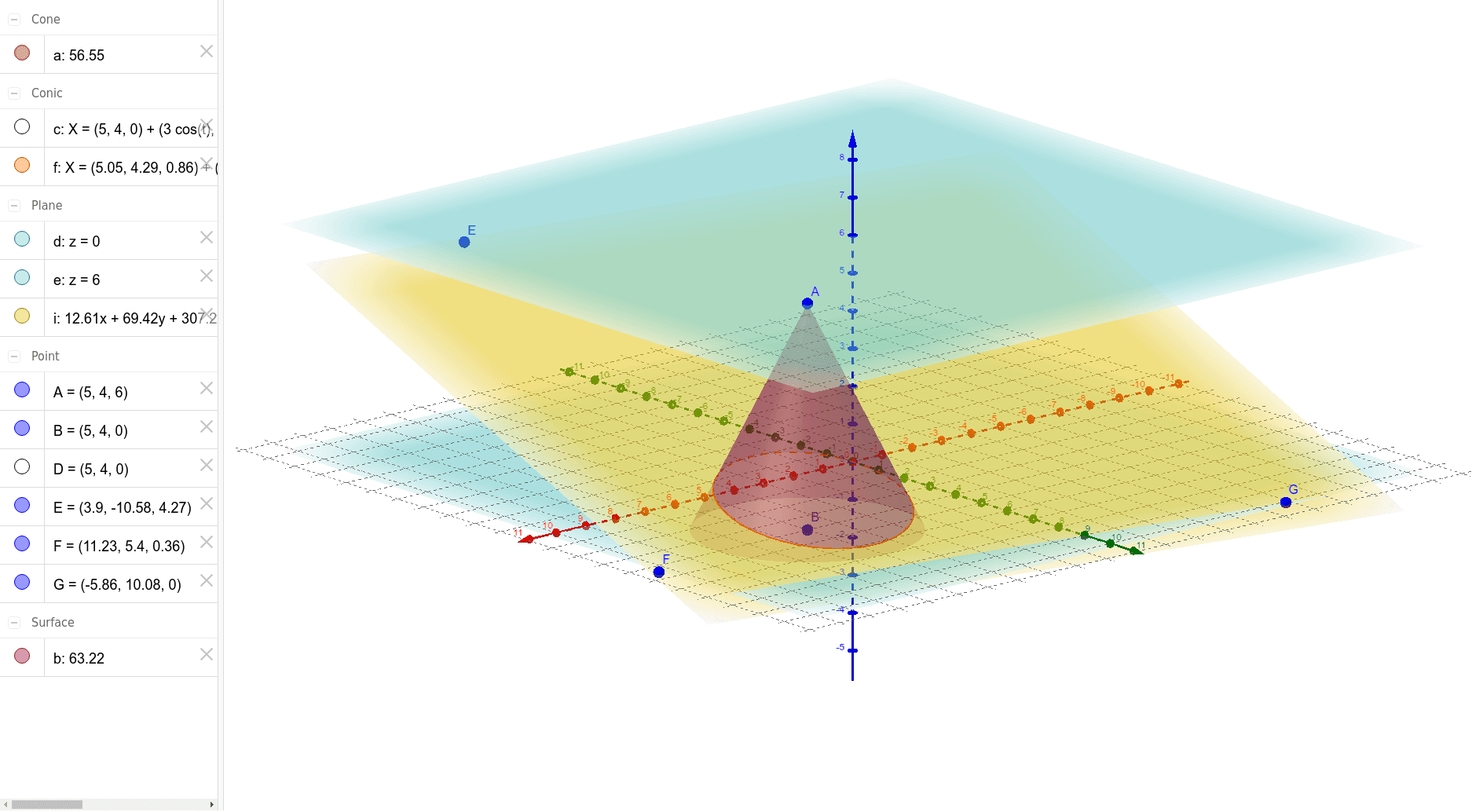
This example demonstrates the construction of a 3D cone and its interaction with a plane and points, including function graphs and scatter plots. Core math concepts involve cones, inscribed circles, vectors, and trigonometry. The construction uses commands like Cone, Plane, PointIn, and IntersectPath, along with objects A, B, a, c, b, d, e, D, E, F, G, i, f. Suitable for high school and above, ideal for teaching and exploring solid geometry, coordinate geometry, and vector concepts.
GeoGebra Commands & Parameters
Cone(B, A, 3) → a, c, bPlane(c) → dPlane(A, d) → ePointIn(d) → DPlane(E, F, G) → iIntersectPath(i, a) → f
AI Drawing Prompt Reference
Create a 3D cone with a base radius of 3, defined by a vertex point and a center point of the base. The cone includes its lateral surface and base disk. Construct a plane parallel to the base passing through the base center, and place a point on that plane. Then, using three given points, define another plane that intersects the cone's lateral surface, producing a curve of intersection. Show the spatial relationships among the cone, the parallel plane, the point, and the intersecting plane with its curve.
The prompt above was compiled from the original drawing commands and is for reference only.