
Building With Cubes: Polyhedral Structure via Prism Construction
Loading the math board and drawing, please wait…
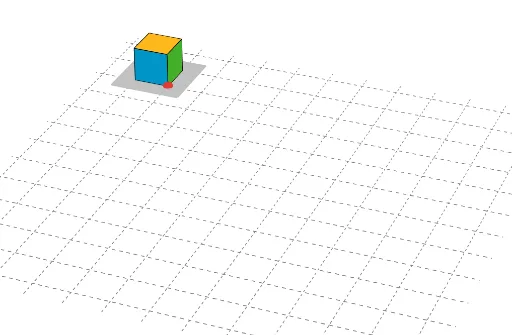
This example demonstrates how to assemble a 3D polyhedral structure from cube-like units by constructing base polygons and then forming prisms, making the relationships between faces and edges visually explicit. It connects the geometric “building” idea with core concepts such as solid geometry (faces, edges, adjacency), polygonal base construction, and the visualization of intersections/overlaps through structured placement. Construction in GeoGebra is driven by the commands Polygon and Prism: base quadrilaterals (e.g., A_2, B_2, C_2, D_2 and poly1_2) are defined along with auxiliary points (a_2, b_2, c_2, d_2), then the prism is formed to obtain the top vertices (E_2, F_2, G_2, H_2). The example further creates and highlights face objects such as faceABFE_2, faceBCGF_2, faceCDHG_2, faceADHE_2, and faceEFGH_2, along with edge objects like edgeAE_2, edgeBF_2, edgeCG_2, edgeDH_2, edgeEF_2, edgeFG_2, edgeGH_2, and edgeEH_2 to emphasize how the “cubes” connect. A similar second set (A_3, B_3, C_3, D_3, poly1_3, …) illustrates the repeatable construction pattern. Suitable for middle-to-high school and introductory college geometry lessons, especially for students learning geometric construction and spatial reasoning.
GeoGebra Commands & Parameters
Polygon(A_2, B_2, C_2, D_2) → poly1_2, a_2, b_2, c_2, d_2Prism(poly1_2, E_2) → e_2, F_2, edgeBF_2, edgeCG_2, edgeDH_2, edgeEF_2, edgeFG_2, edgeGH_2, edgeEH_2, G_2, H_2, faceABFE_2, faceBCGF_2, faceCDHG_2, faceADHE_2, faceEFGH_2, edgeAE_2Polygon(A_3, B_3, C_3, D_3) → poly1_3, a_3, b_3, c_3, d_3Prism(poly1_3, E_3) → e_3, F_3, edgeBF_3, edgeCG_3, edgeDH_3, edgeEF_3, edgeFG_3, edgeGH_3, edgeEH_3, G_3, H_3, faceABFE_3, faceBCGF_3, faceCDHG_3, faceADHE_3, faceEFGH_3, edgeAE_3Polygon(A_4, B_4, C_4, D_4) → poly1_4, a_4, b_4, c_4, d_4Prism(poly1_4, E_4) → e_4, F_4, edgeBF_4, edgeCG_4, edgeDH_4, edgeEF_4, edgeFG_4, edgeGH_4, edgeEH_4, G_4, H_4, faceABFE_4, faceBCGF_4, faceCDHG_4, faceADHE_4, faceEFGH_4, edgeAE_4Polygon(A_5, B_5, C_5, D_5) → poly1_5, a_5, b_5, c_5, d_5Prism(poly1_5, E_5) → e_5, F_5, edgeBF_5, edgeCG_5, edgeDH_5, edgeEF_5, edgeFG_5, edgeGH_5, edgeEH_5, G_5, H_5, faceABFE_5, faceBCGF_5, faceCDHG_5, faceADHE_5, faceEFGH_5, edgeAE_5Polygon(A_6, B_6, C_6, D_6) → poly1_6, a_6, b_6, c_6, d_6Prism(poly1_6, E_6) → e_6, F_6, edgeBF_6, edgeCG_6, edgeDH_6, edgeEF_6, edgeFG_6, edgeGH_6, edgeEH_6, G_6, H_6, faceABFE_6, faceBCGF_6, faceCDHG_6, faceADHE_6, faceEFGH_6, edgeAE_6Polygon(A_7, B_7, C_7, D_7) → poly1_7, a_7, b_7, c_7, d_7Prism(poly1_7, E_7) → e_7, F_7, edgeBF_7, edgeCG_7, edgeDH_7, edgeEF_7, edgeFG_7, edgeGH_7, edgeEH_7, G_7, H_7, faceABFE_7, faceBCGF_7, faceCDHG_7, faceADHE_7, faceEFGH_7, edgeAE_7Polygon(A_8, B_8, C_8, D_8) → poly1_8, a_8, b_8, c_8, d_8Prism(poly1_8, E_8) → e_8, F_8, edgeBF_8, edgeCG_8, edgeDH_8, edgeEF_8, edgeFG_8, edgeGH_8, edgeEH_8, G_8, H_8, faceABFE_8, faceBCGF_8, faceCDHG_8, faceADHE_8, faceEFGH_8, edgeAE_8Polygon(A_9, B_9, C_9, D_9) → poly1_9, a_9, b_9, c_9, d_9Prism(poly1_9, E_9) → e_9, F_9, edgeBF_9, edgeCG_9, edgeDH_9, edgeEF_9, edgeFG_9, edgeGH_9, edgeEH_9, G_9, H_9, faceABFE_9, faceBCGF_9, faceCDHG_9, faceADHE_9, faceEFGH_9, edgeAE_9Polygon(A_{10}, B_{10}, C_{10}, D_{10}) → poly1_{10}, a_{10}, b_{10}, c_{10}, d_{10}Prism(poly1_{10}, E_{10}) → e_{10}, F_{10}, edgeBF_{10}, edgeCG_{10}, edgeDH_{10}, edgeEF_{10}, edgeFG_{10}, edgeGH_{10}, edgeEH_{10}, G_{10}, H_{10}, faceABFE_{10}, faceBCGF_{10}, faceCDHG_{10}, faceADHE_{10}, faceEFGH_{10}, edgeAE_{10}Polygon(A_{11}, B_{11}, C_{11}, D_{11}) → poly1_{11}, a_{11}, b_{11}, c_{11}, d_{11}Prism(poly1_{11}, E_{11}) → e_{11}, F_{11}, edgeBF_{11}, edgeCG_{11}, edgeDH_{11}, edgeEF_{11}, edgeFG_{11}, edgeGH_{11}, edgeEH_{11}, G_{11}, H_{11}, faceABFE_{11}, faceBCGF_{11}, faceCDHG_{11}, faceADHE_{11}, faceEFGH_{11}, edgeAE_{11}Polygon(A_1, B_1, C_1, D_1) → poly1_1, a_1, b_1, c_1, d_1Prism(poly1_1, E_1) → e_1, F_1, edgeBF_1, edgeCG_1, edgeDH_1, edgeEF_1, edgeFG_1, edgeGH_1, edgeEH_1, G_1, H_1, faceABFE_1, faceBCGF_1, faceCDHG_1, faceADHE_1, faceEFGH_1, edgeAE_1Polygon(A_{12}, B_{12}, C_{12}, D_{12}) → poly1_{12}, a_{12}, b_{12}, c_{12}, d_{12}Prism(poly1_{12}, E_{12}) → e_{12}, F_{12}, edgeBF_{12}, edgeCG_{12}, edgeDH_{12}, edgeEF_{12}, edgeFG_{12}, edgeGH_{12}, edgeEH_{12}, G_{12}, H_{12}, faceABFE_{12}, faceBCGF_{12}, faceCDHG_{12}, faceADHE_{12}, faceEFGH_{12}, edgeAE_{12}Polygon(E, B, C, D) → poly1, a, b, c, dPolygon(A_{13}, B_{13}, C_{13}, D_{13}) → poly1_{13}, a_{13}, b_{13}, c_{13}, d_{13}Prism(poly1_{13}, E_{13}) → e_{13}, F_{13}, edgeBF_{13}, edgeCG_{13}, edgeDH_{13}, edgeEF_{13}, edgeFG_{13}, edgeGH_{13}, edgeEH_{13}, G_{13}, H_{13}, faceABFE_{13}, faceBCGF_{13}, faceCDHG_{13}, faceADHE_{13}, faceEFGH_{13}, edgeAE_{13}Polygon(A_{14}, B_{14}, C_{14}, D_{14}) → poly1_{14}, a_{14}, b_{14}, c_{14}, d_{14}Prism(poly1_{14}, E_{14}) → e_{14}, F_{14}, edgeBF_{14}, edgeCG_{14}, edgeDH_{14}, edgeEF_{14}, edgeFG_{14}, edgeGH_{14}, edgeEH_{14}, G_{14}, H_{14}, faceABFE_{14}, faceBCGF_{14}, faceCDHG_{14}, faceADHE_{14}, faceEFGH_{14}, edgeAE_{14}Polygon(A_{15}, B_{15}, C_{15}, D_{15}) → poly1_{15}, a_{15}, b_{15}, c_{15}, d_{15}Prism(poly1_{15}, E_{15}) → e_{15}, F_{15}, edgeBF_{15}, edgeCG_{15}, edgeDH_{15}, edgeEF_{15}, edgeFG_{15}, edgeGH_{15}, edgeEH_{15}, G_{15}, H_{15}, faceABFE_{15}, faceBCGF_{15}, faceCDHG_{15}, faceADHE_{15}, faceEFGH_{15}, edgeAE_{15}Polygon(A_{16}, B_{16}, C_{16}, D_{16}) → poly1_{16}, a_{16}, b_{16}, c_{16}, d_{16}Prism(poly1_{16}, E_{16}) → e_{16}, F_{16}, edgeBF_{16}, edgeCG_{16}, edgeDH_{16}, edgeEF_{16}, edgeFG_{16}, edgeGH_{16}, edgeEH_{16}, G_{16}, H_{16}, faceABFE_{16}, faceBCGF_{16}, faceCDHG_{16}, faceADHE_{16}, faceEFGH_{16}, edgeAE_{16}Polygon(E_{25}, B_{25}, C_{25}, D_{25}) → poly1_{25}, a_{25}, b_{25}, c_{25}, d_{25}Polygon(E_{38}, B_{38}, C_{38}, D_{38}) → poly1_{38}, a_{38}, b_{38}, c_{38}, d_{38}
AI Drawing Prompt Reference
Create a 3D “cube-like building” solid by assembling several prism blocks. For each block, first draw a quadrilateral base defined by four vertices. Then extrude that quadrilateral into a prism by constructing four corresponding top vertices in the elevated position, along with the connecting edges between base and top. Visually emphasize the prism’s faces: the four lateral faces formed by connecting each pair of adjacent base vertices to the matching pair of top vertices, plus the top face. Also highlight the characteristic edges, including the vertical edges linking base to top and the top-cycle edges that outline the upper quadrilateral. Arrange multiple similar prism blocks to suggest a repeatable, connected stacking structure, clearly showing face and edge adjacency.
The prompt above was compiled from the original drawing commands and is for reference only.