
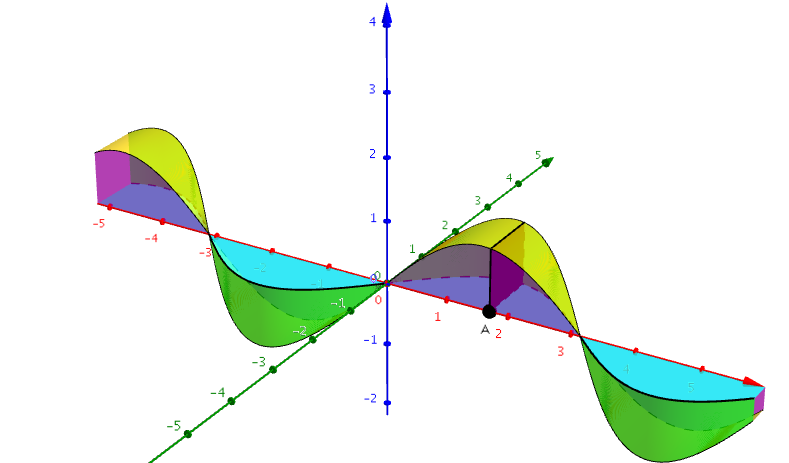
Building Squares on f(x)=sin(x)
Loading the math board and drawing, please wait…
In collections
My 3D Collection
This example demonstrates how to draw segments from the x-axis to the function f(x)=sin(x) and build squares on those segments. The core mathematical concepts involved include function graphs, geometric construction, and integral ideas. The construction uses GeoGebra commands such as Curve (Cartesian), Surface, and Polygon to plot the function, create square surfaces, and define related geometric objects. Suitable for high school and above students to understand functions, geometric constructions, and initial calculus concepts.
GeoGebra Commands & Parameters
CurveCartesian(t, f(t), f(t), t, -10, 10) → aCurveCartesian(t, 0, f(t), t, -10, 10) → bSurface(t, 0, (u * f(t)), t, -10, 10, u, 0, 1) → cSurface(t, f(t), (u * f(t)), t, -10, 10, u, 0, 1) → dSurface(t, (u * f(t)), 0, t, -10, 10, u, 0, 1) → eSurface(t, (u * f(t)), f(t), t, -10, 10, u, 0, 1) → gPolygon(A, (x(A), f(x(A)), 0), (x(A), f(x(A)), f(x(A))), (x(A), 0, f(x(A)))) → poly1, a_1, h, i, j
AI Drawing Prompt Reference
Draw the graph of the function f(x)=sin(x) in a coordinate system, create line segments from the x-axis to the function, and construct squares on these segments. First, plot the function graph and the connecting lines from the x-axis, then generate surfaces perpendicular to the x-axis on these segments, and finally combine these surfaces with the function graph and x-axis to form squares, demonstrating the integration of functions, geometric constructions, and initial calculus concepts.
The prompt above was compiled from the original drawing commands and is for reference only.