
Building Solids from Parallel Plane Figures
Loading the math board and drawing, please wait…
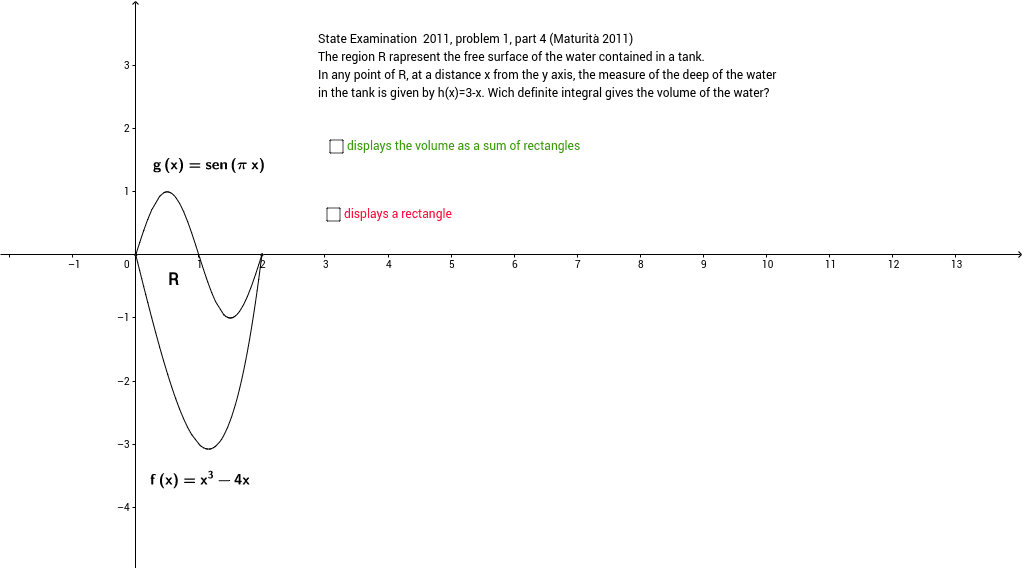
This example demonstrates how to construct a solid figure using parallel rectangles of varying sizes. It involves core math concepts like solid geometry, volume calculation, properties of parallel figures, continuity, and rational numbers. Construction highlights include commands like If, Rotate, Segment, Polygon, Integral, Intersect, Ray, Point, Line, CircleArc, and objects such as f, g, A, B, Volume. Suitable for high school students and educators or learners seeking an intuitive understanding of 3D geometry.
GeoGebra Commands & Parameters
If(0 ≤ x ≤ 2, x^(3) - 4 * x) → fIf(0 ≤ x ≤ 2, sin(π * x)) → gRotate(g, 330*°) → g_1Rotate(f, 330*°) → f_1Rotate(A, 330*°) → A'Rotate(B, 330*°) → B'Segment(A', A_1) → bSegment(B', B_1) → dSegment(B_1, A_1) → ePolygon(A', B', B_1, A_1) → poli1, a', b', b_1, a_1Segment(C_1, C) → jIntegral(l, 0, 2) → VolumeIntersect(f, g, (1.9999999994743312, -4.205350734309832E-9)) → DIntersect(yAxis, xAxis) → ERotate(D, 330*°, E) → D'Ray(E, D') → mRotate(E, 270*°, E) → E'Rotate(E, 270*°, E) → E'_1Rotate(D', 270*°, E) → D''Ray(E'_1, D'') → m'Point(yAxis) → FRay(E, F) → nLine(A', B') → pIntersect(m, p) → GSegment(B', G) → qCircleArc(E, G, C) → r
AI Drawing Prompt Reference
Draw a solid figure constructed from parallel rectangles of varying sizes, demonstrating how they stack to form a 3D shape. Include two bases formed by rotating function graphs 330 degrees, connected by lateral faces. Show key intersection points and rotation centers, with volume calculated via integral. The construction should highlight solid geometry, calculus, and continuity of function graphs.
The prompt above was compiled from the original drawing commands and is for reference only.