
Building Number Sentences with an Open Middle Theme (5)
Loading the math board and drawing, please wait…
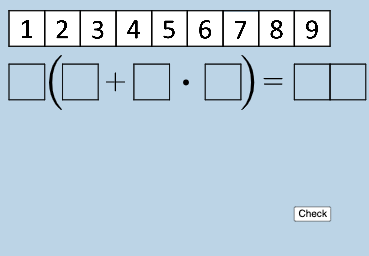
This example demonstrates how “open middle” number sentences can be modeled and checked by linking algebraic relationships to visible geometric structures. The key ideas are forming and interpreting equations/inequalities from partial numerical information, representing values in fraction form, and using conditional logic to determine which relationship holds under given constraints. Construction-wise, it builds polygon-based visual regions via Polygon, uses If to switch behavior or display results based on conditions, provides interactive parameters through Textfield, and displays fraction-style labels with FractionText. The presence of multiple labeled points/objects (e.g., a set of A/B-type markers and several polygon groups) indicates a step-by-step mapping from algebraic quantity to diagram components, supporting inquiry about which number sentences are valid. Suitable for middle school through early high school algebra learning, classroom exploration, and differentiated practice on equation/inequality reasoning.
GeoGebra Commands & Parameters
Polygon(A0, B, 4) → poly0, f, g, h, i, A, CPolygon(A3, H, 4) → poly3, j, k, l, m, E, GPolygon(A7, P, 4) → poly7, n, p, q, r, I, KPolygon(A1, D, 4) → poly1, s, t, a, b, M, OPolygon(A6, N, 4) → poly6, c, d, e, f_1, Q, SPolygon(A2, H2, 4) → poly2, k_1, l_1, m_1, n_1, W, ZPolygon(A8, A8 + (2, 0), 4) → poly8, g_1, h_1, i_1, j_1, U, VPolygon(A9, T, 4) → poly9, p_1, q_1, r_1, s_1, A_1, B_1Polygon(A4, J, 4) → poly4, t_1, a_1, b_1, c_1, C_1, D_1Polygon(A5, L, 4) → poly5, d_1, e_1, f_2, g_2, E_1, F_1Polygon(K_1, L_1, 4) → poly10, l_2, m_2, n_2, p_2, M_1, N_1Polygon(O_1, P_1, 4) → poly12, q_2, r_2, s_2, t_2, Q_1, R_1Polygon(S_1, T_1, 4) → poly13, a_2, b_2, c_2, d_2, U_1, V_1Polygon(C_2, D_2, 4) → poly15, i_3, j_3, k_3, l_3, E_2, F_2Polygon(G_2, H_2, 4) → poly16, m_3, n_3, p_3, q_3, I_2, J_2Polygon(G_{3}, H_{3}, 4) → poly17, m_{4}, n_{4}, p_{4}, q_{4}, I_{3}, J_{3}Polygon(C_{3}, D_{3}, 4) → poly14, i_{4}, j_{4}, k_{4}, l_{4}, E_{3}, F_{3}FractionText(u) → text4Textfield(w) → InputBox1If(o_1 < 0, "less than", o_1 > 0, "greater than", o_1 ≟ 0, "equal to") → text12
AI Drawing Prompt Reference
Draw a series of polygon regions defined by four vertices each. Use If statements to display different labels based on conditions. For example, show 'less than', 'greater than', or 'equal to' depending on the value of o1. Adjust the input box to observe changes in the polygons under different conditions.
The prompt above was compiled from the original drawing commands and is for reference only.