
Build Your Own Right Triangular Prism
Loading the math board and drawing, please wait…
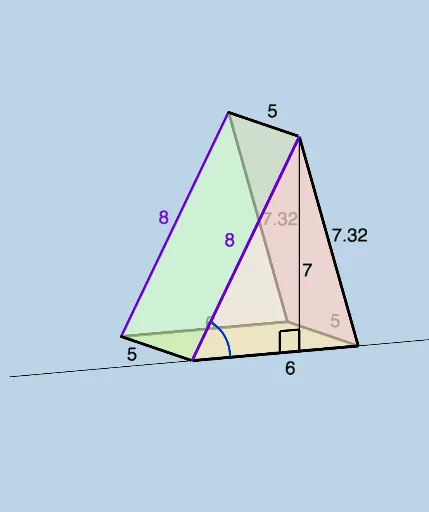
This example demonstrates how to construct a right triangular prism. Key mathematical concepts include the properties and construction methods of right triangles in solid geometry. Using GeoGebra commands such as Line, Sphere, Segment, and Intersect, you can dynamically adjust the height and side lengths of the triangular base. Suitable for middle school and above students or teachers for teaching and learning.
GeoGebra Commands & Parameters
Line((0, 0, triangleheight), (1, 0, triangleheight)) → fSphere(A, oneside) → aSegment(B, A) → jIntersect(f, a) → C, DPolygon(A, C, B) → t1, b_1, a_1, cPolygon(A, D, B) → t2, b_2, a_2, dSegment(A, C) → gSegment(C, B) → iLine(A, (0, 1, 0)) → kLine(B, (b, 1, 0)) → lSphere(B, prismheight) → mSphere(A, prismheight) → eIntersect(k, e) → E, FIntersect(l, m) → G, HLine((x(C), y(C) + 1, z(C)), C) → nSphere(C, prismheight) → oIntersect(n, o) → I, JPolygon(H, F, I) → t3, i_1, h_1, f_1Segment(H, F) → pSegment(F, I) → qSegment(I, H) → rLine((x(D), y(D) + 1, z(D)), D) → tSphere(D, prismheight) → uIntersect(t, u) → K, LPolygon(A, F, I, C) → q1, a_3, f_2, i_2, c_1Polygon(I, H, B, C) → q2, i_3, h_2, b_3, c_2Polygon(A, B, H, F) → q3, a_4, b_4, h_3, f_3Segment(C, I) → g_1Segment(B, H) → j_1Segment(A, F) → k_1Polygon(A, B, D) → t4, d_2, a_5, b_5Polygon(F, H, K) → t5, k_2, f_4, h_4Polygon(A, F, K, D) → q4, a_6, f_5, k_3, d_3Polygon(D, K, H, B) → q5, d_4, k_4, h_5, b_6Segment(A, D) → l_1Segment(D, B) → m_1Segment(D, K) → n_1Segment(K, F) → p_1Segment(K, H) → q_1Circle(((0.3 * j), 0, 0), ((-0.3 * j), 0, 0), (0, 0, (0.3 * j))) → r_1Line(A, B) → s_1OrthogonalLine(C, s_1, space) → t_1OrthogonalLine(D, s_1, space) → g_2Intersect(s_1, t_1) → MIntersect(s_1, g_2) → NAngle(A, M, C) → αAngle(A, N, D) → βSegment(C, M) → j_2Segment(D, N) → l_2Angle(B, A, D) → γAngle(B, A, C) → δTextfield(prismheight) → InputBox1Textfield(b) → InputBox2Textfield(triangleheight) → InputBox3Textfield(oneside) → InputBox4
AI Drawing Prompt Reference
Construct a right triangular prism. First, draw the right triangle base, then extend the right triangle vertically along the base to form the right triangular prism. Draw the three sides of the base triangle, then draw a line perpendicular to the base to form the right triangle. Next, extend the right triangle along the base to form the prism's side faces. Finally, connect the vertices to the corresponding points on the base to complete the right triangular prism.
The prompt above was compiled from the original drawing commands and is for reference only.