
Boat Grid Animation
Loading the math board and drawing, please wait…
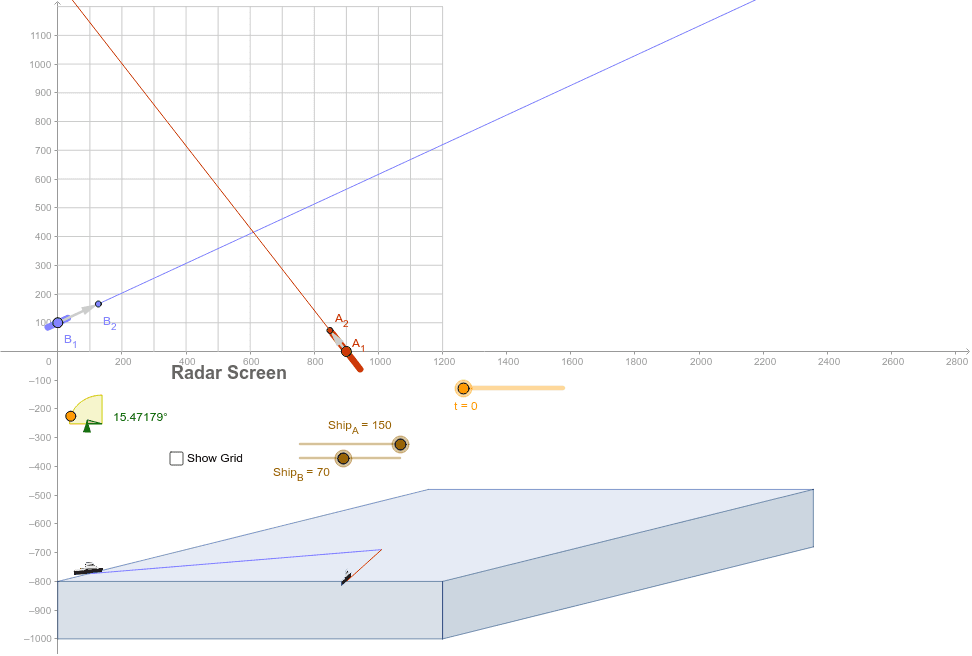
This example illustrates the application of parametric equations in geometry by dynamically showing the movement path of a boat within a grid. Key math concepts include parametric equations, vector operations, geometric transformations, and derivative applications. GeoGebra commands and objects used in construction are OrthogonalLine, Point, Rotate, CircleArc, Circle, Intersect, Angle, Ray, Vector, If, CircleSector, Sequence, Segment, Polygon. Suitable for high school and above learners to understand the practical application of parametric equations and dynamic geometric relationships.
GeoGebra Commands & Parameters
OrthogonalLine(C0, xAxis) → cPoint(c) → ZcenitRotate(Zcenit, 75.00000000000001°, C0) → ZangminCircleArc(C0, Zcenit, Zangmin) → fPoint(f) → ZCircle(C0, Zcenit) → eOrthogonalLine(C0, c) → dIntersect(e, d, 2) → Zang0Angle(Z, C0, Zang0) → αPoint(yAxis) → B_1Ray(B_1, B_2) → aVector(B_1, B_2) → vPoint(xAxis) → A_1Ray(A_1, A_2) → bIntersect(a, b) → CVector(B14, C) → v4Vector(B13, C) → v3Vector(B_1, C) → v1Vector(A_1, A_2) → uVector(A14, C) → u4Vector(A13, C) → u3If((tB3 ≤ tA3) ∧ (tA3 ≤ tB4), tA3, If[(tA3 ≤ tB3) ∧ (tB3 ≤ tA4), tB3, 1000]) → tImpactoIf(t < tImpacto, B0, B_1 + (tImpacto * v)) → BVector(B'_1, B') → uBVector(B', B' - (0, 200)) → wBAngle(wB, uB) → βB3Rotate(B4', ((-βB3) * If[t - tImpacto < tGiro, t - tImpacto, 1]), B') → B4ProaRotate(B4', ((180° - βB3) * If[t - tImpacto < tGiro, t - tImpacto, 1]), B') → B4PopaIf(tB < tImpacto, B4Popa, B4Proa) → B4''If(t < tImpacto, B4', If[t - tImpacto < tGiro, B4'', If[y(B4') - y(B4''') < 200 - Ship_B / 2, B4''', B' - (0, 200 - Ship_B / 2)]]) → BB4ProaRotate(B3', ((-βB3) * If[t - tImpacto < tGiro, t - tImpacto, 1]), B') → B3ProaRotate(B3', ((180° - βB3) * If[t - tImpacto < tGiro, t - tImpacto, 1]), B') → B3PopaIf(tB < tImpacto, B3Popa, B3Proa) → B3''If(t < tImpacto, B4', If[t - tImpacto < tGiro, B4'', If[y(B') - y(B4''') < 200, B4''', B' - (0, 200)]]) → BB4PopaIf(t < tImpacto, B3', If[t - tImpacto < tGiro, B3'', If[y(B3') - y(B3''') < 200, B3''', B' - (0, 200)]]) → BB3ProaIf(t < tImpacto, B3', If[t - tImpacto < tGiro, B3'', If[y(B') - y(B3''') < 200 - Ship_B / 2, B3''', B' - (0, 200 - Ship_B / 2)]]) → BB3PopaRotate(B5', ((180° - βB3) * If[t - tImpacto < tGiro, t - tImpacto, 1]), B') → B5PopaRotate(B5', ((-βB3) * If[t - tImpacto < tGiro, t - tImpacto, 1]), B') → B5ProaIf(tB < tImpacto, B5Popa, B5Proa) → B5''If(t < tImpacto, B5', If[t - tImpacto < tGiro, B5'', If[y(B5') - y(B5''') < 200, B5''', B' - (40, 200)]]) → BB5PopaIf(t < tImpacto, B5', If[t - tImpacto < tGiro, B5'', If[y(B5') - y(B5''') < 200 - Ship_B / 2, B5''', B' - (-40, 200 - Ship_B / 2)]]) → BB5ProaIf(t < tImpacto, A0, A_1 + (tImpacto * u)) → ACircleSector(C0, Zcenit, Zang0) → gSequence(Segment[((s * cos(α)), (s * sin(α)) + k), ((s * cos(α)) + 1200, (s * sin(α)) + k)], s, 0, 1200, 100) → LowerGridHorizontalSequence(Segment[(s, k), (s + (1200 * cos(α)), (1200 * sin(α)) + k)], s, 0, 1200, 100) → LowerGridVerticalSequence(Segment[(0, s), (1200, s)], s, 100, 1200, 100) → UpperGridHorizontalSequence(Segment[(s, 0), (s, 1200)], s, 100, 1200, 100) → UpperGridVeriticalRay(B'_1, B') → hRay(A'_1, A') → iSegment(B'_1, C') → jSegment(A'_1, C') → lSegment(B3, B4) → mSegment(A3, A4) → nIntersect(m, n) → DVector(A', A' - (0, 200)) → wAVector(A_1, C) → u1Vector(A'_1, A') → uAAngle(wA, uA) → βA3If(t < tImpacto, A3', If[y(A3') - y(A3'') < 200, A3'', A3' - (0, 200)]) → AA3If(t < tImpacto, A4', If[y(A4') - y(A4'') < 200, A4'', A4' - (0, 200)]) → AA4If(t < tImpacto, A5', If[y(A5') - y(A5'') < 200, A5'', A5' - (0, 200)]) → AA5If(tB < tImpacto, BB5Popa, BB5Proa) → BB5If(tB < tImpacto, BB3Popa, BB3Proa) → BB3If(tB < tImpacto, BB4Popa, BB4Proa) → BB4Polygon(E, F, H, G) → p1, p11, p12, p13, p14Polygon(E, G, G - (0, 200), E - (0, 200)) → p2, p21, p22, p23, p24Polygon(G, H, H - (0, 200), G - (0, 200)) → p3, p33, p34, p31, p32
AI Drawing Prompt Reference
Draw an animated boat moving within a grid. Start by drawing the center point and grid lines, then create a circular arc to represent the boat's path. Define the boat's initial position and direction, and use rotations and movements to create the boat's parts. Finally, use parametric equations to dynamically show the boat's movement path within the grid, including the rotation of the bow and stern, and the boat's turning after a collision. The process includes arcs, circles, rotations, vectors, angles, and parametric equations.
The prompt above was compiled from the original drawing commands and is for reference only.