
Bike Ride Task
Loading the math board and drawing, please wait…
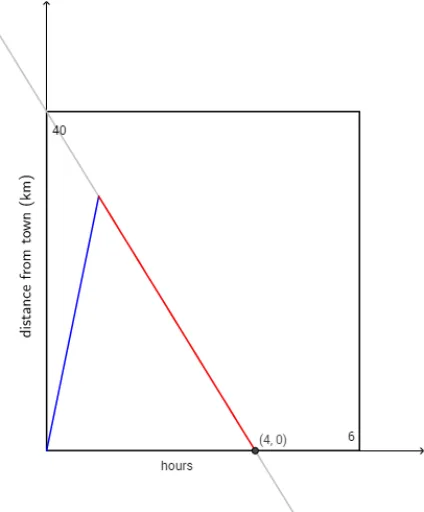
This example demonstrates the path of a bike ride. Core math concepts include functions, trajectories, and geometric construction. Using GeoGebra commands such as Textfield, TableText, Polygon, and RotateText, the path of the bike ride can be constructed. Suitable for middle school and above students to learn geometry and function concepts.
GeoGebra Commands & Parameters
Textfield(a) → InputBox6LaTeX(f_1, true, true) → text2LaTeX(f_2, true, true) → text3TableText({{A1, B1, C1}, {-3, f_1(-3), f_2(-3)}, {-2, f_1(-2), f_2(-2)}, {-1, f_1(-1), f_1(-1)}, {0, f_1(0), f_2(0)}, {1, f_1(1), f_2(1)}, {2, f_1(2), f_2(2)}, {3, f_1(3), f_2(3)}}, "|_r") → text4Textfield(n) → InputBox1Polygon({(0, 0), (0, 40), (6, 40), (6, 0)}) → poly1RotateText("monthly bill (dollars)", 90°) → text10LaTeX(f_2, true, true) → text11Intersect(f, g, (0.75, 22.5)) → ARotateText("distance from town (km)", 90°) → text13
AI Drawing Prompt Reference
Draw a bike ride trajectory showing two function graphs and a table, with a slider to control parameters. Include the path of the bike ride and the distance from town, labeled with monthly bill and distance units. Start by plotting the function graphs, then add a table of function values, draw the bike's path and town location, and finally label the relevant information.
The prompt above was compiled from the original drawing commands and is for reference only.