
Bentley Triangle Orthocenter Construction and Properties
Loading the math board and drawing, please wait…
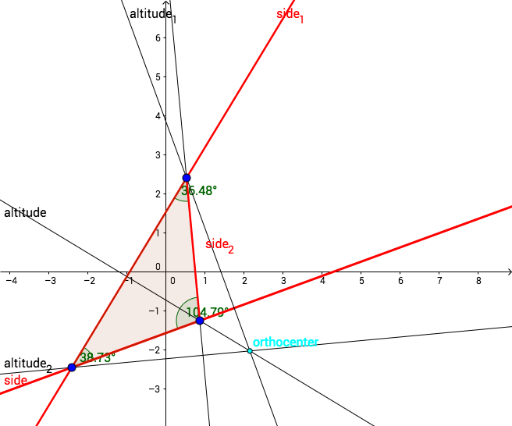
This GeoGebra example demonstrates the construction of the orthocenter of a triangle by drawing the three altitudes (perpendicular lines from each vertex to the opposite side) and finding their common intersection point. It visually shows how the orthocenter relates to the triangle's vertices and sides, and how its position changes with the triangle's shape. Core mathematical concepts include the definition of the orthocenter, properties of altitudes, and angle relationships (α, β, γ) involving the orthocenter. Construction steps use GeoGebra commands: Polygon to create the triangle, Line for sides, OrthogonalLine to draw altitudes from vertices, Intersect to find the orthocenter as the intersection of two altitudes, and Angle to label relevant angles. This resource is suitable for middle school (advanced) or high school students learning triangle centers, geometric construction, and exploring how the orthocenter lies inside, on, or outside the triangle for acute, right, or obtuse triangles respectively.
GeoGebra Commands & Parameters
Polygon(B, D, A) → poly1, a, side_2, dLine(A, D) → sidesLine(B, A) → side_1Line(B, D) → sideOrthogonalLine(A, a) → altitude_1OrthogonalLine(B, side_2) → altitude_2OrthogonalLine(D, d) → altitudeIntersect(altitude_1, altitude_2) → orthocenterAngle(B, A, D) → αAngle(A, D, B) → βAngle(D, B, A) → γ
AI Drawing Prompt Reference
Draw a triangle and draw perpendicular lines from each vertex to the opposite side to form altitudes. Mark the intersection point of the altitudes as the orthocenter. Label the angles at each vertex and show the relationship between the orthocenter and the triangle, including how its position changes with the triangle's shape.
The prompt above was compiled from the original drawing commands and is for reference only.