
Bentley Triangle Orthocenter Construction
Loading the math board and drawing, please wait…
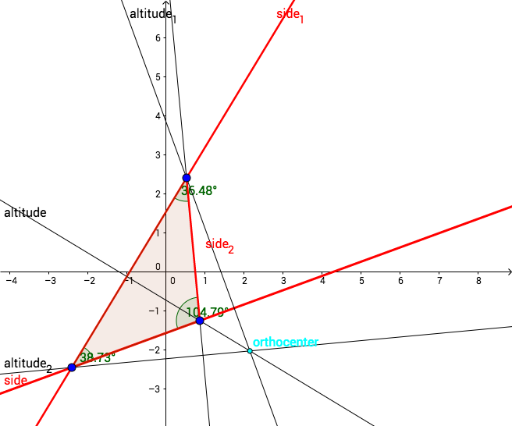
①This example demonstrates how to construct the orthocenter of a triangle named 'Bentley Triangle' using geometric construction, showing the intersection of its three altitudes. ②The core mathematical concept is the orthocenter of a triangle (the common intersection point of the three altitudes), involving basic elements such as polygons, lines, perpendicular lines, intersection points, and angles. ③Construction details: Based on the construction summary, it uses GeoGebra commands including Polygon to create the triangle, Line to draw sides, OrthogonalLine to construct altitudes, Intersect to find the orthocenter, and Angle to mark relevant angles; objects include vertices A, B, D, polygon poly1, sides a, side_2, d, sides, side_1, side, altitudes altitude_1, altitude_2, altitude, orthocenter, and angles α, β, γ. ④This is suitable for middle or high school geometry lessons or introductory geometric construction practice, helping students intuitively understand the existence and uniqueness of the orthocenter and practice using GeoGebra's basic construction tools.
GeoGebra Commands & Parameters
Polygon(B, D, A) → poly1, a, side_2, dLine(A, D) → sidesLine(B, A) → side_1Line(B, D) → sideOrthogonalLine(A, a) → altitude_1OrthogonalLine(B, side_2) → altitude_2OrthogonalLine(D, d) → altitudeIntersect(altitude_1, altitude_2) → orthocenterAngle(B, A, D) → αAngle(A, D, B) → βAngle(D, B, A) → γ
AI Drawing Prompt Reference
Draw a triangle and show its three altitudes, where each altitude is a line segment from a vertex perpendicular to the opposite side, the intersection point of the three altitudes is the orthocenter, and label the three angles formed at the vertices.
The prompt above was compiled from the original drawing commands and is for reference only.