
Classifying Triangles: Equilateral, Isosceles, Right, and Scalene
Loading the math board and drawing, please wait…
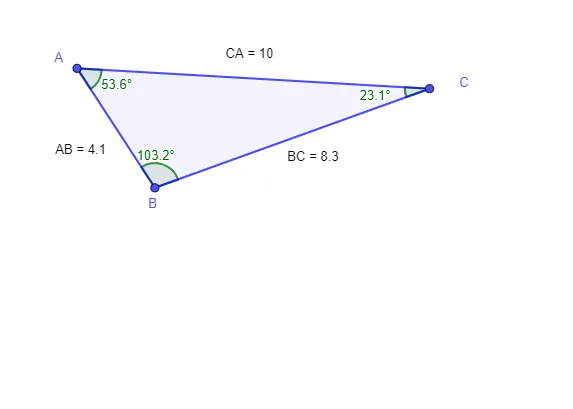
① This example demonstrates how to classify triangles based on side lengths and angles, visually distinguishing equilateral, isosceles, right, and scalene triangles. ② Core mathematical concepts include triangle side-angle relationships, definitions of equilateral/isosceles/right/scalene triangles, and applications of geometric mean, arithmetic mean, and linear regression in data analysis. ③ Construction highlights: using GeoGebra commands Polygon to create triangle ABC, Distance to measure side lengths (distanceAB, distanceBC, distanceCA), Angle to measure interior angles (α, β), and text objects (TextAB, etc.) to display measurements; it also includes scatter plot, linear regression, and median line for statistical exploration. ④ Suitable for middle school to high school students learning geometry classification and introductory statistics, as well as for classroom demonstrations or self-study.
GeoGebra Commands & Parameters
Polygon(A, B, C) → t1, c, a, bDistance(A, B) → distanceABDistance(B, C) → distanceBCDistance(C, A) → distanceCAAngle(C, B, A) → αAngle(B, A, C) → A_{2}Angle(A, C, B) → β
AI Drawing Prompt Reference
Draw a triangle ABC on a coordinate plane and outline its three sides. Measure the side lengths AB, BC, and CA, and display their numeric values with clear labels. Also measure the interior angles at the vertices: the angle at B, the angle at A, and the angle at C, and mark them with distinct angle symbols tied to their positions. Arrange the measurements so the side-length and angle readouts visually match the triangle, creating a clean setup for classifying equilateral, isosceles, right, or scalene triangles.
The prompt above was compiled from the original drawing commands and is for reference only.