
Beach Beast: Theo Jansen-Inspired Legged Linkage Demo
Loading the math board and drawing, please wait…
In collections
Portugal is great
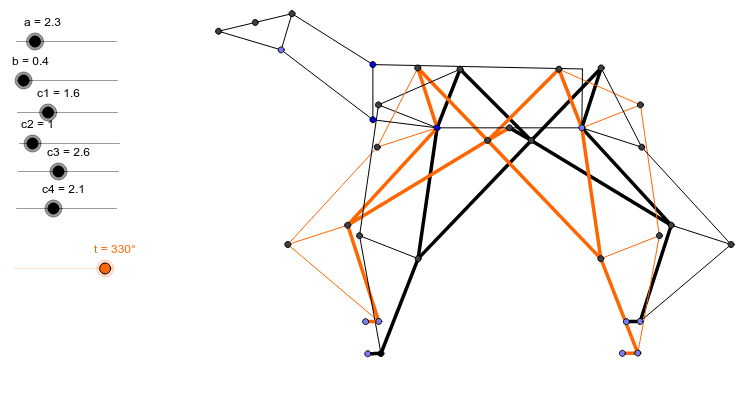
① This example demonstrates a horse‑like “beach beast” linkage mechanism inspired by Theo Jansen, showing its periodic walking gait on the plane. ② Core mathematical concepts include geometric transformations (rotation, reflection, translation), circle‑line intersections, midpoint and perpendicular constructions, and parametric trajectory analysis. ③ Construction highlights: the model uses GeoGebra commands Point, Segment, Midpoint, Rotate, Angle, Circle, Intersect, OrthogonalLine, Line, Mirror to create objects a, t, b, c1‑c4, A, B, C, B′, β, d, e, D, f, g, E, h, i, j, F, k, p, q, G, l, m, n, H, r, s, b1, e1, I, t_1, d1, f1, J, achieving coordinated leg motion through linked rotations and reflections. ④ Suitable for high‑school geometry electives, university geometric modeling courses, and STEM maker workshops that illustrate linkage mechanisms and dynamic geometry.
GeoGebra Commands & Parameters
Point(Circle[A, a]) → BSegment(A, B) → cMidpoint(c) → CRotate(B, t, C) → B'Angle(B, C, B') → βCircle(C, b) → dSegment(C, B') → eIntersect(d, e, 1.0) → DCircle(D, c1) → fCircle(A, c2) → gIntersect(f, g, 2.0) → ESegment(D, E) → hSegment(A, E) → iOrthogonalLine(A, i) → jIntersect(g, j, 2.0) → FSegment(A, F) → kCircle(D, c3) → pCircle(A, c4) → qIntersect(p, q, 1.0) → GSegment(A, G) → lLine(G, k) → mLine(F, l) → nIntersect(m, n) → HOrthogonalLine(G, m) → rSegment(D, G) → sSegment(H, G) → b1OrthogonalLine(G, b1) → e1Point(e1) → ISegment(G, I) → t_1Circle(D, c1) → d1Circle(B, c2) → f1Intersect(d1, f1, 1.0) → JSegment(D, J) → a1Segment(B, J) → g1Circle(D, c3) → h1Circle(B, c4) → k1Intersect(h1, k1, 2.0) → KCircle(B, c2) → p1OrthogonalLine(B, g1) → i1Intersect(p1, i1, 1.0) → LSegment(B, L) → j1Segment(B, K) → l1Line(L, l1) → m1Line(K, j1) → n1OrthogonalLine(K, n1) → q1Point(q1) → MIntersect(m1, n1) → NSegment(K, M) → r1Segment(D, K) → s1Circle(B, c2) → d2Circle(B, c4) → h2Rotate(D, 240.0*°, C) → OAngle(O, C, D) → γCircle(O, c1) → t1Circle(A, c2) → e2Intersect(t1, e2, 2.0) → PSegment(O, P) → a2Segment(A, P) → b2OrthogonalLine(A, b2) → f2Intersect(e2, f2, 2.0) → QSegment(A, Q) → g2Circle(O, c3) → k2Circle(A, c4) → p2Intersect(k2, p2, 1.0) → RSegment(O, R) → i2Segment(A, R) → j2Line(R, k) → l2OrthogonalLine(R, l2) → m2Line(R, g2) → n2Line(Q, j2) → q2Intersect(n2, q2) → SOrthogonalLine(R, n2) → r2Point(r2) → TSegment(R, T) → s2Circle(O, c1) → t2Circle(B, c2) → d3Intersect(t2, d3, 1.0) → USegment(O, U) → a3Segment(B, U) → b3OrthogonalLine(B, b3) → e3Intersect(p1, e3, 1.0) → VCircle(O, c3) → f3Circle(B, c4) → g3Intersect(f3, g3, 2.0) → WSegment(B, W) → h3Line(V, h3) → i3Segment(B, V) → j3Line(W, j3) → k3OrthogonalLine(W, k3) → l3Point(l3) → ZIntersect(i3, k3) → A1Segment(O, W) → m3Segment(W, Z) → n3Segment(V, A1) → p3Segment(A1, W) → q3Segment(A1, Z) → r3Segment(U, V) → s3Segment(J, L) → t3Segment(N, K) → a4Segment(N, L) → b4Segment(N, M) → d4Segment(E, F) → e4Segment(R, S) → f4Segment(S, T) → g4Segment(Q, S) → h4Segment(F, H) → i4Segment(H, I) → j4Segment(P, Q) → k4Segment(C, O) → l4Segment(C, D) → m4OrthogonalLine(T, s2) → n4OrthogonalLine(I, t_1) → p4OrthogonalLine(Z, n3) → q4OrthogonalLine(M, r1) → r4Line(F1, G1) → c5Line(T, c5) → s4Line(I, c5) → t4Line(Z, c5) → a5Line(M, c5) → b5Point(s4) → B1Point(t4) → C1Point(a5) → D1Point(b5) → E1Segment(T, B1) → d5Segment(I, C1) → e5Segment(M, E1) → f5Segment(Z, D1) → g5Segment(H1, I1) → h5Circle(P, 1.5) → k5Point(k5) → J1Circle(H1, 1.0) → p5Circle(I1, 1.0) → q5Segment(P, J1) → m5Circle(J1, 1.0) → r5Point(r5) → K1Segment(J1, K1) → i5Segment(H1, K1) → j5Segment(J1, H1) → a6Rotate(J1, 45.0*°, K1) → L1Angle(J1, K1, L1) → δCircle(K1, 0.6) → s5Segment(K1, L1) → l5Intersect(s5, l5, 1.0) → M1Segment(K1, M1) → n5Segment(I1, M1) → t5Rotate(K1, 300.0*°, M1) → N1Angle(N1, M1, K1) → εMirror(M1, N1) → O1Segment(K1, O1) → b6Segment(O1, N1) → c6Segment(N1, M1) → d6Segment(H1, A) → e6Segment(A, B) → f6Segment(B, P1) → g6Segment(P1, I1) → h6
AI Drawing Prompt Reference
Draw a Theo Jansen‑inspired multi‑leg linkage that shows a periodic walking gait. Start from a fixed base point, add a rotatable link and mark its midpoint as a pivot; rotate the link about this pivot to obtain a symmetric point. Draw a circle centered at the pivot with a given radius intersecting the link to locate a joint. From that joint draw two circles intersecting circles centered at the base to create two further joints, then connect them into a triangular frame. Erect a perpendicular through the base to one circle to get a support point, and use intersections of perpendiculars and connecting lines to form the extending leg segment. Mirror the construction to produce the opposite leg, and drive all links with a slider so the mechanism walks smoothly.
The prompt above was compiled from the original drawing commands and is for reference only.