
Basic Quadrilateral Pyramid and Net
Loading the math board and drawing, please wait…
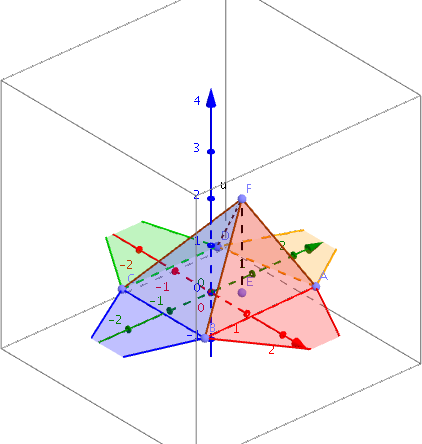
This example demonstrates a quadrilateral pyramid in 3D view along with its net. Key math concepts include solid geometry, polygon area, surface area, and volume calculations. Construction involves commands like PointIn, Ray, Point, Polygon, Pyramid, Circle, Intersect, Segment, showcasing the use of GeoGebra objects. Suitable for high school students learning 3D shapes and properties, or for teaching related mathematical concepts.
GeoGebra Commands & Parameters
PointIn(a) → APointIn(a) → BPointIn(a) → CPointIn(a) → DPointIn(a) → ERay(E, E + (0, 0, 1)) → bPoint(b) → FPolygon(A, B, C, D) → poly1, a_1, b_1, c, dPyramid(poly1, F) → e, faceABF, faceBCF, faceCDF, faceADF, edgeAF, edgeBF, edgeCF, edgeDFCircle(A, Distance[F, A], xOyPlane) → fCircle(B, Distance[F, B], xOyPlane) → gIntersectIntersect(f, g, 1) → GPolygon(B, G, A) → poly2, a_2, b_2, g_1Circle(C, Distance[F, C], xOyPlane) → hIntersectIntersect(g, h, 1) → HPolygon(H, B, C) → poly3, c_1, h_1, b_3Circle(D, Distance[F, D], xOyPlane) → kIntersectIntersect(h, k, 1) → IPolygon(I, C, D) → poly4, d_1, i, c_2IntersectIntersect(f, k, 2) → JPolygon(D, J, A) → poly5, a_3, d_2, jSegment(E, F) → l