
Basic Dilation
Loading the math board and drawing, please wait…
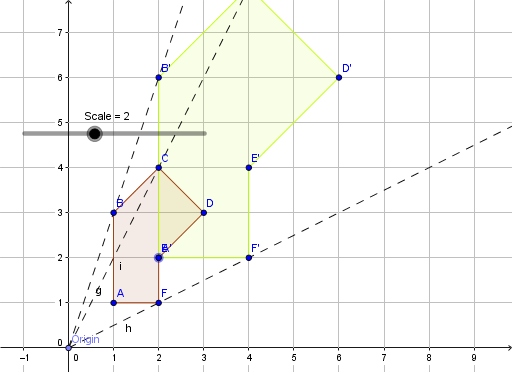
This example demonstrates basic dilation. It involves the core mathematical concept of dilation, which changes the size of a figure without altering its shape. Using GeoGebra commands such as Dilate (dilation) and Ray (ray), the effect of dilation can be constructed. Suitable for students at the middle school level and above to learn about the concept and application of dilation.
GeoGebra Commands & Parameters
Polygon(A, B, C, D, E, F) → poly1, a, b, c, d, e, fPoint(xAxis) → OriginDilate(A, Scale, Origin) → A'Dilate(B, Scale, Origin) → B'Dilate(C, Scale, Origin) → C'Dilate(D, Scale, Origin) → D'Dilate(E, Scale, Origin) → E'Dilate(F, Scale, Origin) → F'Polygon(A', B', C', D', E', F') → poly1', a', b', c', d', e', f'Ray(Origin, B) → gRay(Origin, F) → hRay(Origin, C) → i
AI Drawing Prompt Reference
Draw a polygon with six vertices, then scale all the vertices of this polygon from the origin by a certain factor to create a new polygon. Also, draw three rays from the origin passing through two vertices and another vertex of the original polygon to show the scaling process and direction.
The prompt above was compiled from the original drawing commands and is for reference only.