
Baravelle Spirals
Loading the math board and drawing, please wait…
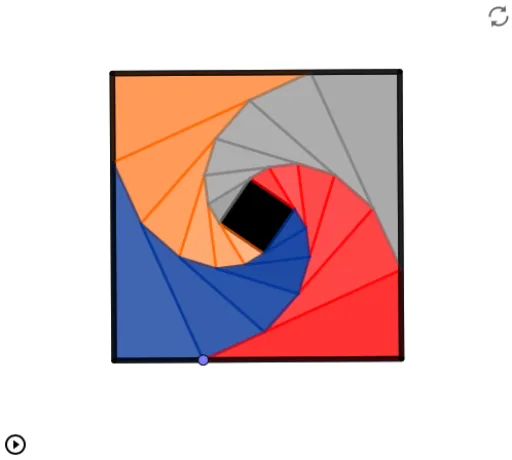
This example demonstrates the construction of Baravelle spirals. It involves geometric construction and function graphing. Using commands like Polygon, Point, Distance, Circle, and Intersect, a series of spiral lines can be constructed. Suitable for high school mathematics education and learning.
GeoGebra Commands & Parameters
Polygon(A, B, 4) → poly1, f, g, h, i, C, DPoint(f) → EDistance(A, E) → AEDistance(A, B) → ABCircle(B, Segment[A, E]) → cIntersect(c, g, 1) → FPolygon(E, F, 4) → poly2, j, l, m, n, G, HCircle(E, (k * j)) → dIntersect(d, j, 1) → IIntersect(g, j) → JCircle(F, Segment[E, I]) → eIntersect(e, l, 1) → KPolygon(I, K, 4) → poly3, p, q, r, s, L, MCircle(I, (p * k)) → tIntersect(t, p, 1) → NCircle(K, Segment[I, N]) → c_1Intersect(c_1, q, 1) → OPolygon(N, O, 4) → poly4, a, b, f_1, g_1, P, QCircle(N, (a * k)) → d_1Intersect(d_1, a) → R,Circle(O, Segment[N, R]) → e_1Intersect(e_1, b, 1) → SPolygon(R, S, 4) → poly5, h_1, i_1, j_1, k_1, T, UCircle(R, (h_1 * k)) → p_1Intersect(p_1, h_1, 1) → VCircle(S, Segment[R, V]) → q_1Intersect(q_1, i_1, 1) → WPolygon(V, W, 4) → poly6, l_1, m_1, n_1, r_1, Z, A_1Circle(V, (l_1 * k)) → s_1Intersect(s_1, l_1) → B_1,Circle(W, Segment[V, B_1]) → t_1Intersect(t_1, m_1, 1) → C_1Polygon(B_1, C_1, 4) → poly7, a_1, b_1, f_2, g_2, D_1, E_1Polygon(D, H, G) → t1, g_3, d_2, h_2Polygon(H, M, L) → t2, l_2, h_3, m_2Polygon(M, Q, P) → t3, p_2, m_3, q_2Polygon(U, T, Q) → t4, q_3, u, t_2Polygon(U, A_1, Z) → t5, z_1, u_1, a_2Polygon(A_1, E_1, D_1) → t6, d_3, a_3, e_2Polygon(C_1, W, B_1) → t7, b_2, c_2, wPolygon(W, S, V) → t8, v, w_1, s_2Polygon(S, O, R) → t9, r_2, s_3, oPolygon(O, K, N) → t10, n_2, o_1, k_2Polygon(K, F, I) → t11, i_2, k_3, f_3Polygon(E_1, V, B_1) → t12, b_3, e_3, v_1Polygon(A_1, R, V) → t13, v_2, a_4, r_3Polygon(U, N, R) → t14, r_4, u_2, n_3Polygon(Q, I, N) → t15, n_4, q_4, i_3Polygon(M, E, I) → t16, i_4, m_4, e_4Polygon(H, A, E) → t17, e_5, h_4, a_5Polygon(F, B, E) → t18, e_6, f_4, b_4Polygon(D_1, Z, C_1) → t19, c_3, d_4, z_2Polygon(Z, T, W) → t20, w_2, z_3, t_3Polygon(T, P, S) → t21, s_4, t_4, p_3Polygon(P, L, O) → t22, o_2, p_4, l_3Polygon(L, G, K) → t23, k_4, l_4, g_4Polygon(G, C, F) → t24, f_5, g_5, c_4Polygon(A, B, 4) → poly8, j_2, j_3, j_4, h_5, F_1, G_1Polygon(A_2, B_2, 4) → poly1_1, f_{10}, g_{10}, h_{11}, i_9, C_2, D_3Distance(A_2, B_2) → AB_1Polygon(A_4, B_4, 4) → poly1_2, f_{20}, g_{20}, h_{23}, i_{19}, C_6, D_7Distance(A_4, B_4) → AB_2Polygon(A_5, B_5, 4) → poly1_3, f_{21}, g_{21}, h_{22}, i_{18}, C_4, D_5Distance(A_5, B_5) → AB_3
AI Drawing Prompt Reference
Draw a spiral pattern composed of multiple squares and circles, expanding outward from the center. Each square's side length increases progressively, with vertices connected to form circles. The circles intersect the square sides to create new vertices, repeating the process to build the spiral. The design features nested squares and circles, showcasing geometric construction patterns.
The prompt above was compiled from the original drawing commands and is for reference only.