
Balance Beam Equations: Learning Equations with Manipulatives
Loading the math board and drawing, please wait…
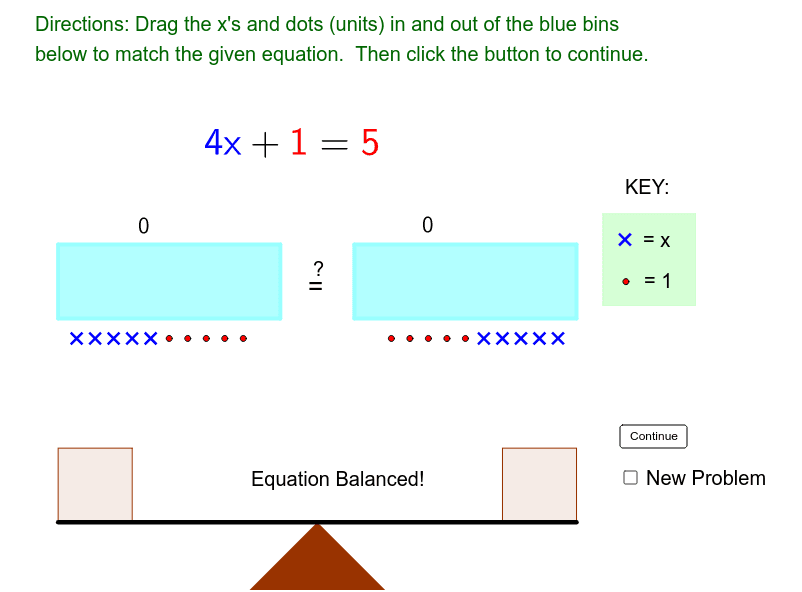
① This interactive GeoGebra example demonstrates how equations maintain balance on a beam, allowing students to manipulate unit weights and variable blocks on both sides. ② Core math concepts include properties of equality, linear equations, combining like terms, and understanding the meaning of variables and constants through hands-on interaction. ③ Construction highlights: uses commands such as Element, Polygon, OrthogonalLine, Point, Sum, If, Segment, Line, and Intersect to build the beam, fulcrum, and lists of left/right units and x-blocks; ProblemPicker and NewProblem generate random exercises, with sliders controlling expression limits. ④ Ideal for middle school algebra instruction, also suitable for upper elementary students as an introduction to symbolic reasoning through concrete manipulation.
GeoGebra Commands & Parameters
Element(LeftSideUnitList, ProblemPicker) → LeftUnitFromListElement(RightSideUnitList, ProblemPicker) → RightUnitFromListElement(RightSideXList, ProblemPicker) → RightXFromListElement(LeftSideXList, ProblemPicker) → LeftXFromListPolygon(FulcrumBottomLeft, FulcrumTop, FulcrumBottomRight) → poly1, fulcrumbottomright, fulcrumbottomleft, fulcrumtopOrthogonalLine(A_11, fulcrumtop) → b_2Point(b_2) → RightUnit5OrthogonalLine(A_12, fulcrumtop) → a_2Point(a_2) → RightUnit4OrthogonalLine(A_13, fulcrumtop) → t_1Point(t_1) → RightUnit3OrthogonalLine(A_14, fulcrumtop) → s_1Point(s_1) → RightUnit2OrthogonalLine(A_15, fulcrumtop) → r_1Point(r_1) → RightUnit1Sum({(y(RightUnit1) > ExpressionLowerLimit) ∧ (y(RightUnit1) < ExpressionUpperLimit), (y(RightUnit2) > ExpressionLowerLimit) ∧ (y(RightUnit2) < ExpressionUpperLimit), (y(RightUnit3) > ExpressionLowerLimit) ∧ (y(RightUnit3) < ExpressionUpperLimit), (y(RightUnit4) > ExpressionLowerLimit) ∧ (y(RightUnit4) < ExpressionUpperLimit), (y(RightUnit5) > ExpressionLowerLimit) ∧ (y(RightUnit5) < ExpressionUpperLimit)}) → SumRightSideUnitOrthogonalLine(A_20, fulcrumtop) → q_1Point(q_1) → LeftUnit1OrthogonalLine(A_19, fulcrumtop) → p_1Point(p_1) → LeftUnit2OrthogonalLine(A_18, fulcrumtop) → n_1Point(n_1) → LeftUnit3OrthogonalLine(A_17, fulcrumtop) → m_1Point(m_1) → LeftUnit4OrthogonalLine(A_16, fulcrumtop) → l_1Point(l_1) → LeftUnit5Sum({(y(LeftUnit1) > ExpressionLowerLimit) ∧ (y(LeftUnit1) < ExpressionUpperLimit), (y(LeftUnit2) > ExpressionLowerLimit) ∧ (y(LeftUnit2) < ExpressionUpperLimit), (y(LeftUnit3) > ExpressionLowerLimit) ∧ (y(LeftUnit3) < ExpressionUpperLimit), (y(LeftUnit4) > ExpressionLowerLimit) ∧ (y(LeftUnit4) < ExpressionUpperLimit), (y(LeftUnit5) > ExpressionLowerLimit) ∧ (y(LeftUnit5) < ExpressionUpperLimit)}) → SumLeftSideUnitOrthogonalLine(A_6, fulcrumtop) → k_1Point(k_1) → RightX5OrthogonalLine(A_7, fulcrumtop) → j_1Point(j_1) → RightX4OrthogonalLine(A_8, fulcrumtop) → g_1Point(g_1) → RightX3OrthogonalLine(A_9, fulcrumtop) → c_1Point(c_1) → RightX2OrthogonalLine(A_10, fulcrumtop) → b_1Point(b_1) → RightX1Sum({(y(RightX1) > ExpressionLowerLimit) ∧ (y(RightX1) < ExpressionUpperLimit), (y(RightX2) > ExpressionLowerLimit) ∧ (y(RightX2) < ExpressionUpperLimit), (y(RightX3) > ExpressionLowerLimit) ∧ (y(RightX3) < ExpressionUpperLimit), (y(RightX4) > ExpressionLowerLimit) ∧ (y(RightX4) < ExpressionUpperLimit), (y(RightX5) > ExpressionLowerLimit) ∧ (y(RightX5) < ExpressionUpperLimit)}) → SumRightSideXOrthogonalLine(A_5, fulcrumtop) → tPoint(t) → LeftX5OrthogonalLine(A_4, fulcrumtop) → sPoint(s) → LeftX4OrthogonalLine(A_3, fulcrumtop) → rPoint(r) → LeftX3OrthogonalLine(A_2, fulcrumtop) → qPoint(q) → LeftX2OrthogonalLine(A_1, fulcrumtop) → pPoint(p) → LeftX1Sum({(y(LeftX1) > ExpressionLowerLimit) ∧ (y(LeftX1) < ExpressionUpperLimit), (y(LeftX2) > ExpressionLowerLimit) ∧ (y(LeftX2) < ExpressionUpperLimit), (y(LeftX3) > ExpressionLowerLimit) ∧ (y(LeftX3) < ExpressionUpperLimit), (y(LeftX4) > ExpressionLowerLimit) ∧ (y(LeftX4) < ExpressionUpperLimit), (y(LeftX5) > ExpressionLowerLimit) ∧ (y(LeftX5) < ExpressionUpperLimit)}) → SumLeftSideXIf(BeamLeftTotal > BeamRightTotal, -1, If[BeamLeftTotal ≟ BeamRightTotal, 0, 1]) → BeamLeftYValueSegment(BeamLeft, BeamRight) → aLine(BeamLeft, BeamRight) → bPoint(b) → APoint(b) → BOrthogonalLine(A, b) → cOrthogonalLine(BeamLeft, b) → dOrthogonalLine(BeamRight, a) → eOrthogonalLine(B, b) → fPoint(c) → COrthogonalLine(C, c) → gIntersect(d, g) → DIntersect(e, g) → EIntersect(f, g) → FPolygon(C, A, BeamLeft, D) → poly2, LeftBasketLeftSide, LeftBasketBottomSide, LeftBasketRightSide, LeftBasketTopSidePolygon(BeamRight, B, F, E) → poly3, RightBasketBottomSide, RightBasketRightSide, RightBasketTopSide, RightBasketLeftSideSegment(A, B) → hPolygon(H, J, M, L) → poly4, h_1, LeftExpressionBottom, m, lPolygon(N, O, K, I) → poly5, n, RightExpressionBottom, k, iPoint(Circle[FulcrumBottomLeft, -7]) → PSegment(FulcrumBottomLeft, P) → a_1OrthogonalLine(A_10, fulcrumtop) → d_1OrthogonalLine(A_9, fulcrumtop) → e_1OrthogonalLine(A_9, fulcrumtop) → f_1OrthogonalLine(A_8, fulcrumtop) → i_1Sum({(y(LeftX1) > ExpressionLowerLimit) ∧ (y(LeftX1) < ExpressionUpperLimit), (y(LeftX2) > ExpressionLowerLimit) ∧ (y(LeftX2) < ExpressionUpperLimit), (y(LeftX3) > ExpressionLowerLimit) ∧ (y(LeftX3) < ExpressionUpperLimit), (y(LeftX4) > ExpressionLowerLimit) ∧ (y(LeftX4) < ExpressionUpperLimit), (y(LeftX5) > ExpressionLowerLimit) ∧ (y(LeftX5) < ExpressionUpperLimit)}) → LeftSideXTotalIf(BeamLeftYValue ≟ 0, "Equation Balanced!", "Not Balanced") → text7Element(RightSideXList, 2) → jElement(RightSideXList, 1) → TestSegment(S, TRC) → c_2OrthogonalLine(S, c_2) → d_2Point(d_2) → TOrthogonalLine(T, d_2) → e_2OrthogonalLine(TRC, c_2) → f_2Intersect(e_2, f_2) → UPolygon(S, T, U, TRC) → poly6, s_2, t_2, u, trc
AI Drawing Prompt Reference
Draw a balance beam with a triangular fulcrum at the center and a horizontal beam passing through it. On each side of the beam, hang five unit squares and five variable blocks (rectangles labeled x), which can move up or down to indicate quantity changes. The number of blocks on each side is determined by a random problem, and the beam must remain balanced. Below the beam, add scale marks or limit lines to show the range of expression values. The overall design is educational, emphasizing the balance of equations on both sides.
The prompt above was compiled from the original drawing commands and is for reference only.