
Automated Tractor Mowing Model
Loading the math board and drawing, please wait…
In collections
UCSS Secondary Math I Unit 4 Lesson 2
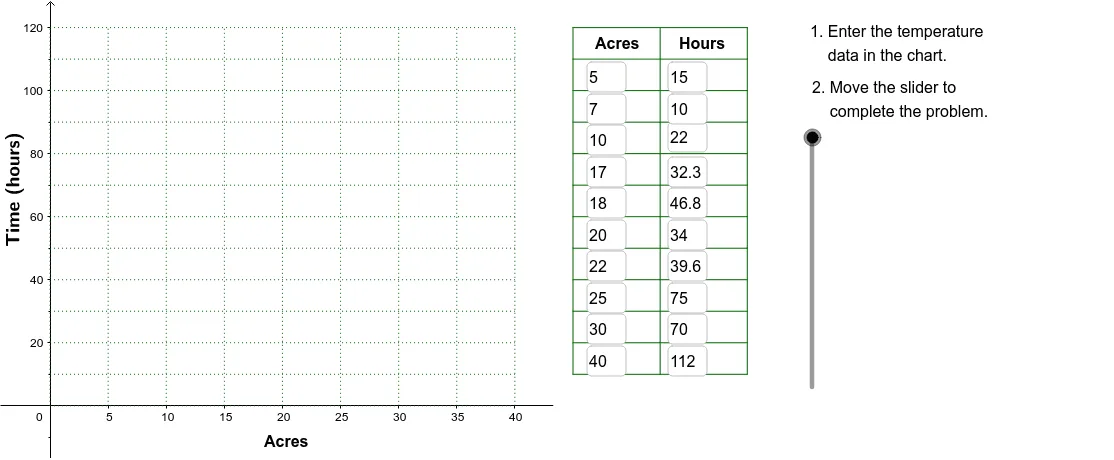
This example demonstrates constructing an automated tractor mowing model for lawns of varying sizes using GeoGebra. It involves core math concepts like area calculation, limits, multiplication, median line, and boxplot. The construction utilizes commands and objects such as Corner, Polygon, Textfield, Line, Sequence, and VerticalText. Suitable for high school mathematics education, illustrating the application of statistics and geometry combined.
GeoGebra Commands & Parameters
Corner(2) → Corn2Corner(3) → Corn3Polygon(Corn1, Corn2, Corn3, Corn4) → poly1, corn1, corn2, corn3, corn4Textfield(A2) → InA2Textfield(A3) → InA3Textfield(A4) → InA4Textfield(A5) → InA5Textfield(A6) → InA6Textfield(A7) → InA7Textfield(A8) → InA8Textfield(A9) → InA9Textfield(B9) → InB9Textfield(B8) → InB8Textfield(B7) → InB7Textfield(B6) → InB6Textfield(B5) → InB5Textfield(B4) → InB4Textfield(B3) → InB3Textfield(B2) → InB2Line(Pt1, Pt2) → FitLineSequence(Segment[(45, 10 + (10 * j)), (60, 10 + (10 * j))], j, 0, 11) → LnListSequence(Segment[(45 + (7.5 * j), 10), (45 + (7.5 * j), 120)], j, 0, 2) → LnList2Textfield(A10) → InA10Textfield(A11) → InA11Textfield(B10) → InB10Textfield(B11) → InB11VerticalText("\text{Time (hours)}") → DownLegendSequence(Segment[((5 * i), 0), ((5 * i), 120)], i, 0, 8) → GridxSequence(Segment[(0, (10 * i)), (40, (10 * i))], i, 0, 12) → Gridy
AI Drawing Prompt Reference
Draw an automated tractor mowing model featuring a lawn as a quadrilateral, marked by four corners with area calculation. Include multiple text boxes for input, a fitted line, and generate horizontal and vertical line segments as a grid using sequences. Label the time axis and grid lines.
The prompt above was compiled from the original drawing commands and is for reference only.