
Astroide Geometric Construction
Loading the math board and drawing, please wait…
In collections
geometriadinamica.es
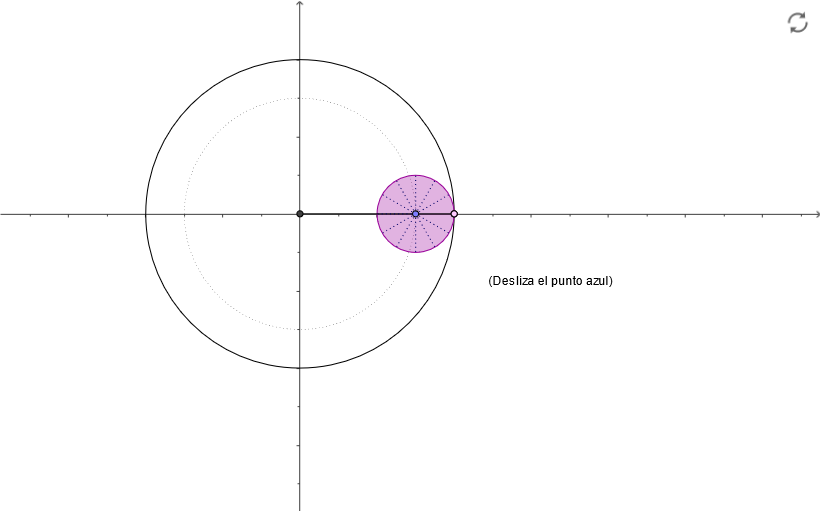
This example demonstrates the geometric construction of a complex shape named Astroide, involving concepts like continuity, geometric construction, inequalities, area calculation, and solid geometry. Key GeoGebra commands and objects used in the construction include Intersect, Point, Circle, Ray, Angle, Rotate, Segment, and CircleArc, suitable for high school and above students exploring solid geometry and geometric constructions.
GeoGebra Commands & Parameters
Intersect(xAxis, yAxis) → A_1Point(xAxis) → B_1Circle(A_1, 0.75) → dPoint(d) → ARay(A_1, A) → bAngle(B_1, A_1, A) → αCircle(A_1, B_1) → cIntersect(c, b) → D,Circle(A, 0.25) → eRotate(D, (-4 * α), A) → CSegment(A, C) → aCircleArc(A, C, D) → fCircleArc(A_1, B_1, D) → gSegment(A_1, A) → hRotate(A, 29.999999999999996°, A) → A'Rotate(C, 29.999999999999996°, A) → C'Segment(A', C') → iRotate(A', 29.999999999999996°, A) → A''Rotate(C', 29.999999999999996°, A) → C''Segment(A'', C'') → jRotate(A'', 29.999999999999996°, A) → A'''Rotate(C'', 29.999999999999996°, A) → C'''Segment(A''', C''') → kRotate(A''', 29.999999999999996°, A) → A''''Rotate(C''', 29.999999999999996°, A) → C''''Segment(A'''', C'''') → lRotate(A'''', 29.999999999999996°, A) → A'''''Rotate(C'''', 29.999999999999996°, A) → C'''''Segment(A''''', C''''') → mRotate(A''''', 29.999999999999996°, A) → A''''''Rotate(C''''', 29.999999999999996°, A) → C''''''Segment(A'''''', C'''''') → nRotate(A'''''', 29.999999999999996°, A) → A'''''''Rotate(C'''''', 29.999999999999996°, A) → C'''''''Segment(A''''''', C''''''') → pRotate(A''''''', 29.999999999999996°, A) → A''''''''Rotate(C''''''', 29.999999999999996°, A) → C''''''''Segment(A'''''''', C'''''''') → qRotate(A'''''''', 29.999999999999996°, A) → A'''''''''Rotate(C'''''''', 29.999999999999996°, A) → C'''''''''Segment(A''''''''', C''''''''') → sRotate(A''''''''', 29.999999999999996°, A) → A''''''''''Rotate(C''''''''', 29.999999999999996°, A) → C''''''''''Segment(A'''''''''', C'''''''''') → tRotate(A'''''''''', 29.999999999999996°, A) → A'''''''''''Rotate(C'''''''''', 29.999999999999996°, A) → C'''''''''''Segment(A''''''''''', C''''''''''') → a_1Rotate(D, (-4 * α), A) → B
AI Drawing Prompt Reference
Draw an astroide curve by first drawing a circle at the intersection of the x-axis and y-axis, then selecting a point A on the circle and drawing a ray b from A. Next, draw a circle c with A1 as the center and B1 as the radius, intersecting ray b at point D. Draw a circle e with A as the center and 0.25 as the radius, then rotate point D by 4 times angle α to get point C, and draw line segment AC. Then draw circle arcs f and g, and repeatedly rotate points A and C, following the same steps to form the astroide curve.
The prompt above was compiled from the original drawing commands and is for reference only.