
ASA Congruent Triangles Exploration
Loading the math board and drawing, please wait…
In collections
Module 1: Eureka Congruence, Transformations, Constructions
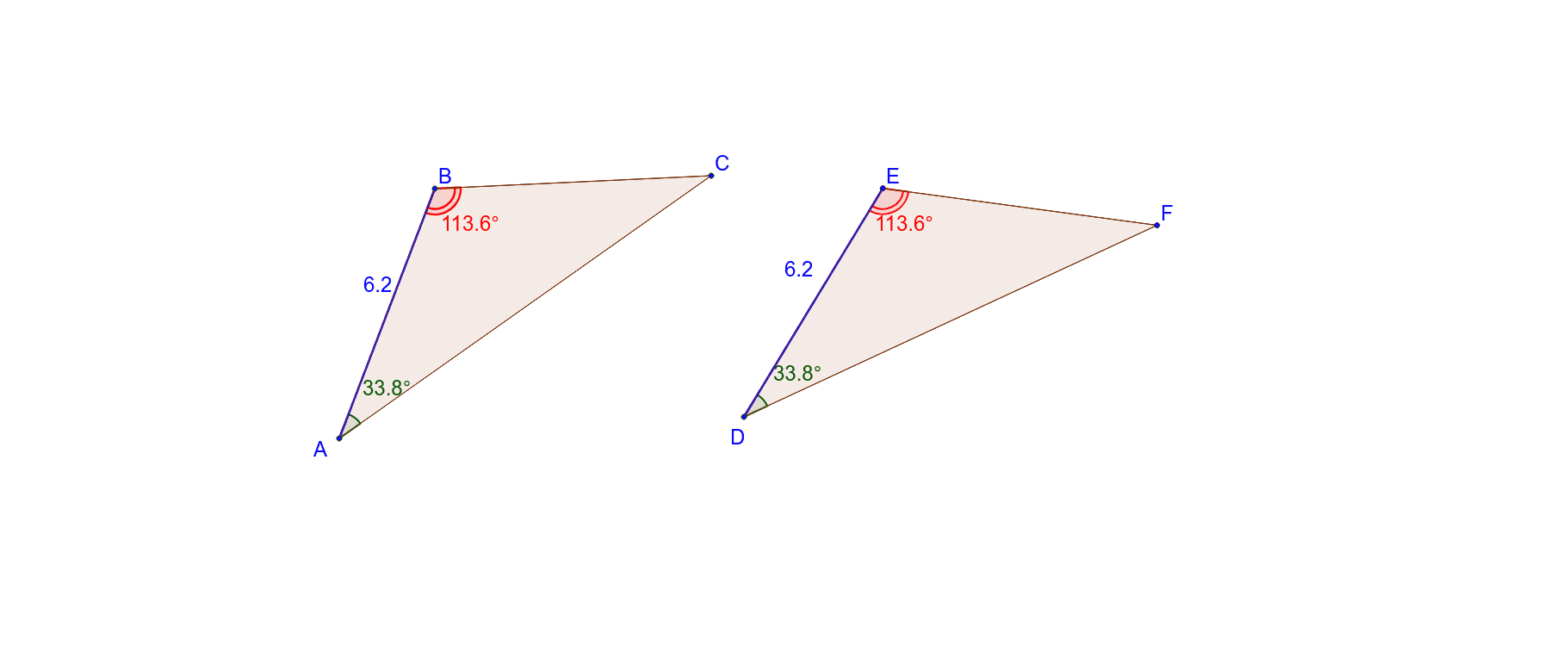
ASA Congruent Triangles Exploration demonstrates how to construct and analyze triangles based on the Angle-Side-Angle criterion. Key mathematical concepts include triangle congruence, geometric construction, and transformations. The construction involves using GeoGebra commands such as Segment, Circle, Angle, and Rotate to create triangles and related figures. This example is suitable for middle or high school geometry education to understand triangle congruence properties and applications.
GeoGebra Commands & Parameters
Segment(A, B) → aCircle(A, B) → cSegment(A, C) → bSegment(C, B) → dAngle(C, A, B) → αAngle(A, B, C) → βCircle(D, a) → ePoint(e) → ESegment(D, E) → fRotate(E, (-α), D) → E'Angle(E', D, E) → γLine(D, E') → gRotate(D, β, E) → D'Angle(D, E, D') → δLine(E, D') → hIntersect(g, h) → FLine(D, F) → iSegment(E, F) → jSegment(D, F) → kPolygon(A, B, C) → poly1, c_1, a_1, b_1Polygon(D, E, F) → poly2, f_1, d_1, e_1
AI Drawing Prompt Reference
Draw two triangles to illustrate the Angle-Side-Angle congruence criterion. Start with a triangle having three vertices and mark two of its interior angles. Using one side as a radius, draw a circle and pick a point on it to begin the second triangle. Rotate the first triangle's angles to construct a second triangle congruent to the first. Connect the vertices to complete the second triangle and label its corresponding angles. Show both triangles with their matching sides and angles.
The prompt above was compiled from the original drawing commands and is for reference only.