
ASA Congruence Triangle Rigidity Demonstration
Loading the math board and drawing, please wait…
In collections
Similarity and Congruence Year 8 Pedagogies in Practice
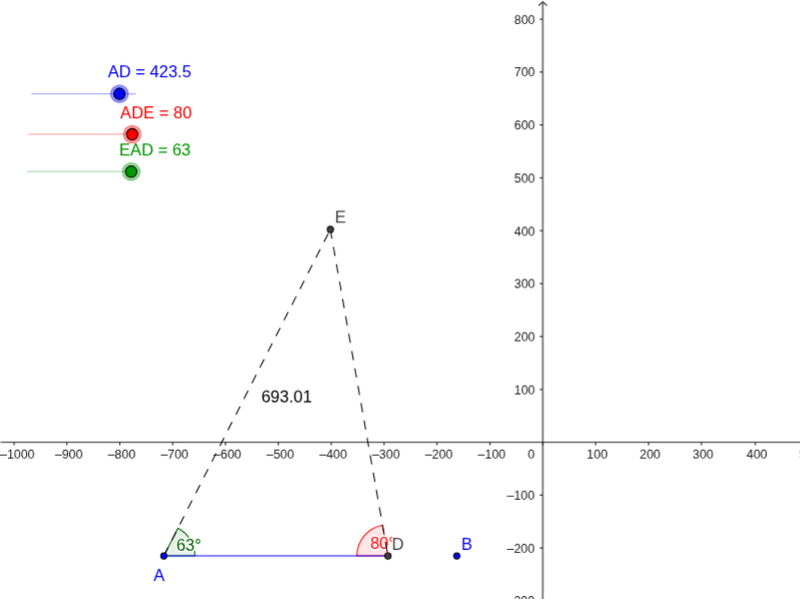
This interactive GeoGebra applet demonstrates that a triangle defined by the Angle‑Side‑Angle (ASA) criterion is rigid: once constructed, it cannot be deformed when moved. The core mathematics involve ASA congruence, triangle rigidity, and geometric transformations such as rotation and translation. The construction uses GeoGebra commands like Line, Circle, Intersect, Segment, Rotate, Angle, and Distance, creating objects AD, A, B, a, c, D, b, EAD, ADE, D', β, A', α, d, e, E, f, g, distanceAE, TextAE, distanceED. It is intended for high‑school geometry students and teachers as a visual aid for understanding congruence and rigid motion.
GeoGebra Commands & Parameters
Line(A, B) → aCircle(A, AD) → cIntersect(c, a, 2) → DSegment(A, D) → bRotate(D, EAD°, A) → D'Angle(D, A, D') → βRotate(A, -(ADE°), D) → A'Angle(A', D, A) → αLine(A, D') → dLine(D, A') → eIntersect(d, e) → ESegment(A, E) → fSegment(E, D) → gDistance(A, E) → distanceAEDistance(E, D) → distanceED
AI Drawing Prompt Reference
Draw a triangle with two fixed vertices and a base side. From one endpoint of the base, draw a circle centered at that endpoint with radius equal to the base length, intersecting the extended base line to get a third point. Then, using each endpoint of the base as a rotation center, rotate the base by given angles to create two rays; their intersection forms the triangle's apex. Connect the apex to both base endpoints to complete the triangle. Finally, label the side lengths and display the two base angles to show that the triangle remains rigid under movement.
The prompt above was compiled from the original drawing commands and is for reference only.