
Artformer Helix
Loading the math board and drawing, please wait…
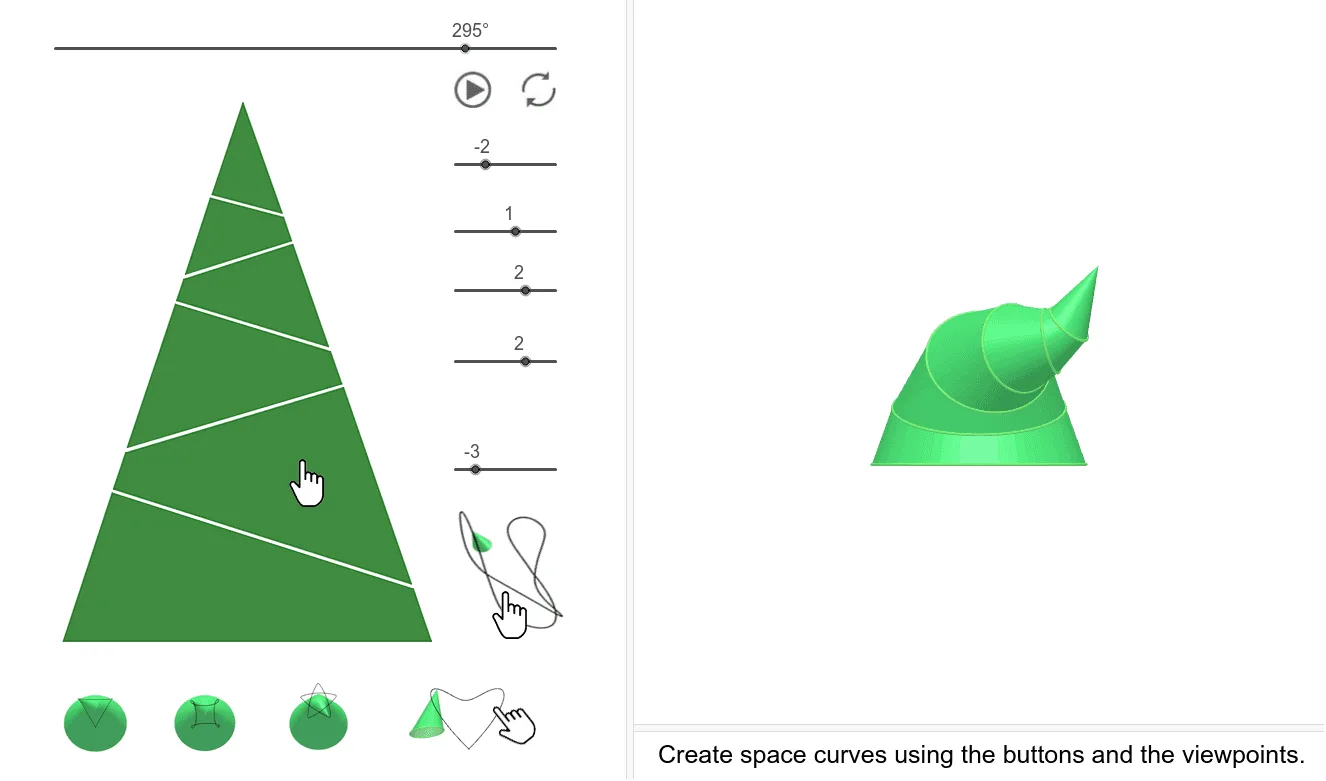
This example demonstrates the construction of an artformer helix. It involves core mathematical concepts such as circles, ellipses, and rotation. Using GeoGebra commands like Line, Sequence, Polygon, and Intersect, the helix shape can be dynamically constructed. Suitable for high school and above students learning coordinate geometry and parametric equations.
GeoGebra Commands & Parameters
Line((0, 0, 0), (0, 0, 1)) → tSequence((XB((i * β)), YB((i * β)), ZB((i * β))), i, 0, n) → PontBPolygon(PontB) → Lap1Intersect(t, Line[A1, B2]) → MtDistance(Mt, A1) → maDistance(Mt, B2) → mbSequence((XC((i * β)), YC((i * β)), ZC((i * β))), i, 0, n) → PontCCircle((d, 0, 0), r, xOyPlane) → k0Line((0, 0, 0), (0, 1, 0)) → tyEllipse((0, fe), (0, (-fe)), ae) → e0Dilate(Translate[e0, Vector[(0, 0, c)]], dd, Mt) → alaplapRotate(k0, φ, ty) → kör1Rotate(kör1, 180°, t) → k1Dilate(k1, nm, Mt) → kör2Dilate(kör1, nm^(2), Mt) → kör3Dilate(kör2, nm^(2), Mt) → kör4Dilate(kör3, nm^(2), Mt) → kör5Dilate(PontB, nm^(2), Mt) → PontDCenter(kör1) → K1OrthogonalLine(K1, kör1) → f1Dilate(PontC, nm^(2), Mt) → PontEPolygon(PontC) → Lap2Dilate(PontD, nm^(2), Mt) → PontFPolygon(PontD) → Lap3Polygon(PontE) → Lap4Polygon(PontF) → Lap5Segment(A, Mt) → alkotóSequence((XA((i * β)), YA((i * β)), ZA((i * β))), i, 0, n) → PontAPolygon(PontA) → LapASequence(Polygon[Element[PontB, i], Element[PontA, i], Element[PontA, i + 1], Element[PontB, i + 1]], i, 1, n) → QASequence(Polygon[Element[PontC, i], Element[PontB, i], Element[PontB, i + 1], Element[PontC, i + 1]], i, 1, n) → Q1Sequence(Polygon[Element[PontD, i], Element[PontC, i], Element[PontC, i + 1], Element[PontD, i + 1]], i, 1, n) → Q2Sequence(Polygon[Element[PontF, i], Element[PontE, i], Element[PontE, i + 1], Element[PontF, i + 1]], i, 1, n) → Q4Sequence(Polygon[Element[PontF, i], Element[PontF, i + 1], Mt], i, 1, n) → QCCenter(kör2) → K2Center(kör3) → K3Center(kör4) → K4Center(kör5) → K5OrthogonalLine(K2, kör2) → f2OrthogonalLine(K3, kör3) → f3OrthogonalLine(K4, kör4) → f4OrthogonalLine(K5, kör5) → f5Rotate(Rotate[Rotate[Rotate[Rotate[Mt, (s5 * α), f5], (s4 * α), f4], (s3 * α), f3], (s2 * α), f2], (s1 * α), f1) → MRotate(Rotate[Rotate[Rotate[Rotate[kör5, (s5 * α), f5], (s4 * α), f4], (s3 * α), f3], (s2 * α), f2], (s1 * α), f1) → Fkör5Rotate(Rotate[Rotate[Rotate[kör4, (s4 * α), f4], (s3 * α), f3], (s2 * α), f2], (s1 * α), f1) → Fkör4Rotate(Rotate[Rotate[kör3, (s3 * α), f3], (s2 * α), f2], (s1 * α), f1) → Fkör3Rotate(Rotate[kör2, (s2 * α), f2], (s1 * α), f1) → Fkör2Rotate(Q1, (s1 * α), f1) → FQ1Rotate(Rotate[Rotate[Rotate[Rotate[QC, (s5 * α), f5], (s4 * α), f4], (s3 * α), f3], (s2 * α), f2], (s1 * α), f1) → FQCRotate(Rotate[Rotate[Rotate[Q4, (s4 * α), f4], (s3 * α), f3], (s2 * α), f2], (s1 * α), f1) → FQ4Rotate(Rotate[Q2, (s2 * α), f2], (s1 * α), f1) → FQ2Rotate(Rotate[Rotate[Rotate[Rotate[Lap5, (s5 * α), f5], (s4 * α), f4], (s3 * α), f3], (s2 * α), f2], (s1 * α), f1) → FLAP5Rotate(Rotate[Rotate[Rotate[Lap4, (s4 * α), f4], (s3 * α), f3], (s2 * α), f2], (s1 * α), f1) → FLAP4Rotate(Rotate[Rotate[Lap3, (s3 * α), f3], (s2 * α), f2], (s1 * α), f1) → FLAP3Rotate(Rotate[Lap2, (s2 * α), f2], (s1 * α), f1) → FLAP2If(Cs, Locus[M, α], NaN) → vmSequence(Polygon[Element[PontE, i], Element[PontD, i], Element[PontD, i + 1], Element[PontE, i + 1]], i, 1, n) → Q3Rotate(Rotate[Rotate[Q3, (s3 * α), f3], (s2 * α), f2], (s1 * α), f1) → FQ3If(n ≤ 12, (360°) / n, 5°) → dαPolygon(G, F, H) → t1, h, g, fPolygon(K, J, I, L) → q1, k, j, i, lPolygon(N, O, P, Q) → q2, n_1, o, p, qPolygon(R, S, T, U) → q3, r_1, s_1, t_1, uPolygon(V, E_1, D_1, C_1) → q4, v, e_1, d_1, c_1Polygon(B_1, A_1, Z, W) → q5, b_1, a_1, z_1, w
AI Drawing Prompt Reference
Create an art helix with a series of ellipses and circles, gradually building it through rotation and scaling. Start by drawing a line, then generate a sequence of points to form the helix's base. Next, draw a series of circles and ellipses, and use rotation and scaling to make them rotate around a central point and gradually increase in size. Finally, use these circles and ellipses to create polygons, forming the helix's appearance.
The prompt above was compiled from the original drawing commands and is for reference only.