
Arithmetic Sequence: Geometric Visualization and Summation
Loading the math board and drawing, please wait…
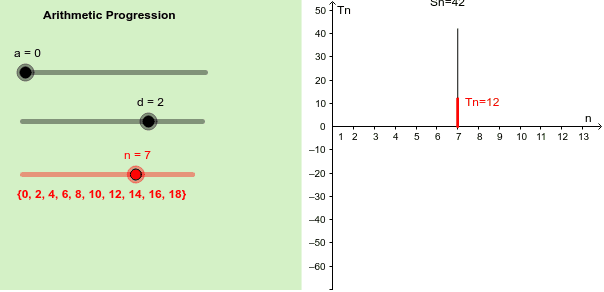
① This GeoGebra example dynamically visualizes the terms, common difference, and partial sums of an arithmetic sequence, translating abstract formulas into intuitive geometric representations. ② Core mathematical concepts include the general term formula, common difference, number of terms, sum of the first n terms, and the connection between sequences and geometric shapes such as parallelograms and polygons. ③ Construction highlights: using commands like Segment, Sequence, Element, Corner, and Polygon to build segments and shapes corresponding to sequence terms; sliders (e.g., n and d) control the number of terms and difference, updating points and summation areas in real time; text objects display formulas and numerical values. ④ Suitable for middle and high school mathematics (grades 8–12) teaching of sequences, as well as pre-calculus or introductory mathematical modeling, helping learners grasp linear growth and the geometric derivation of summation formulas.
GeoGebra Commands & Parameters
Segment((n, 0), (n, AP(n))) → TnSegment((n, 0), (n, AS(n))) → SnSequence(a + ((n - 1) * d), n, 1, 10) → ArithprogElement(Arithprog, n) → thiselementCorner(1, 1) → Cnr1Corner(1, 2) → Cnr2Corner(1, 3) → Cnr3Corner(1, 4) → Cnr4Polygon(CN1, CN2, CN3, CN4) → Panel, cn1, cn2, cn3, cn4
AI Drawing Prompt Reference
Draw a geometric visualization of an arithmetic sequence with the first 10 terms, each represented by a line segment, showing sliders for the common difference and number of terms that can be dynamically adjusted. Use these segments to construct a quadrilateral to demonstrate the sum of the first few terms of the sequence.
The prompt above was compiled from the original drawing commands and is for reference only.