
Areas of Regular Polygons on the Edges of Any Triangle
Loading the math board and drawing, please wait…
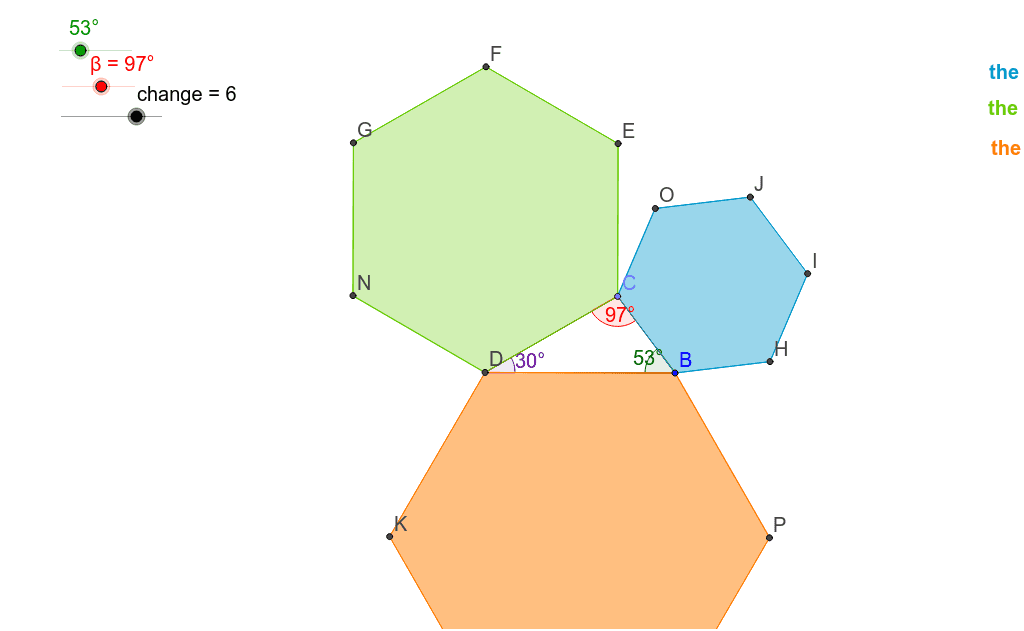
This example demonstrates constructing regular polygons on the edges of any triangle and calculating their areas. Key mathematical concepts include polygons, triangles, and area calculations. Using commands like Rotate, Angle, Point, Intersect, and Polygon, you can dynamically change the shape of the triangle and the number of sides of the polygons, observing how the areas change. Suitable for high school geometry and calculus courses.
GeoGebra Commands & Parameters
Rotate(A, α, B) → A'Angle(A, B, A') → γRay(B, A) → a_1Ray(B, A') → bPoint(a_1) → CRotate(B, (-β), C) → B'Angle(B', C, B) → δRay(C, B') → cIntersect(c, b) → DPolygon(D, B, C) → poly1, c_1, d, b_1Angle(B, D, C) → εPolygon(D, C, change) → poly2, e, q_1, t_1, c_2, E, F, G, N, Q, T, W, f, B_1, E_1, H_1, g, h, i, d_1, g_1, j_1, m_1Polygon(C, B, change) → poly3, j, r_1, a_2, d_2, H, I, J, O, R, U, Z, k, C_1, F_1, I_1, l, m, n, e_1, h_1, k_1, n_1Polygon(B, D, change) → poly4, p, s_1, b_2, e_2, K, L, M, P, S, V, A_1, q, D_1, G_1, J_1, r, s, t, f_1, i_1, l_1, p_1
AI Drawing Prompt Reference
Draw an arbitrary triangle and construct regular polygons on each of its sides. First, rotate point A around B by angle α to get A', then calculate the angle γ of ∠AAB'. Next, draw ray a1 from B, rotate B around A' to get B', calculate the angle δ of ∠BCB', draw ray c from C, and find the intersection D of c and b. Use D, B, and C to construct the first regular polygon poly1. Then, change the number of sides and repeat the process to construct the second and third regular polygons poly2 and poly3, and finally construct the fourth regular polygon poly4.
The prompt above was compiled from the original drawing commands and is for reference only.