
Area of Trapeziums: Geometric Derivation and Dynamic Demonstration
Loading the math board and drawing, please wait…
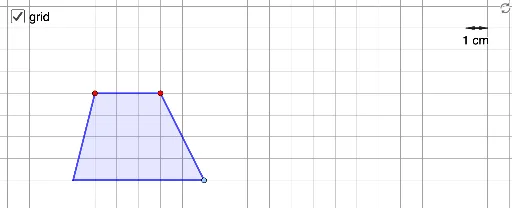
This GeoGebra example dynamically demonstrates the derivation of the trapezium (trapezoid) area formula through geometric transformations. It visually shows how a trapezium can be decomposed and rearranged into a parallelogram or rectangle using translation, rotation, and reflection, thereby revealing why the area equals half the sum of the parallel sides times the height. Core mathematical concepts include trapezium properties, area conservation, geometric transformations (translation, rotation, reflection), and the mid-segment (median) of a trapezium. The construction uses commands such as Polygon to create the trapezium, Translate and Rotate to duplicate and reposition triangular parts, Midpoint to construct the median, Vector and Distance to measure side lengths and height, and Slider to control variable parameters. This resource is suitable for middle school to high school students learning geometry, and for teachers to illustrate the area formula in class, fostering geometric intuition and understanding of transformation-based proofs.
GeoGebra Commands & Parameters
Point(Ray[(1, 0), (2, 0)]) → BIntersect(xAxis, yAxis) → OPoint(xAxis) → HPoint(x = x(H)) → H'Point(y = y(H')) → CPoint(Ray[C + (1, 0), C + (2, 0)]) → DIf(t ≤ 1, t, 1) → t1Midpoint(D, B) → MPolygon(O, C, D, B) → tri1, l_1, b_1, l_2, b_2If(t < 1, 0, 1 ≤ t < 2, t - 1, 1) → t2If(t < 2, 0, t - 2) → t3Translate({tri1}, Vector[(t1 * Vector[(1, 1)])]) → tri2Rotate(tri2, ((-t2) * 180°), M + (1, 1)) → tri3Translate(tri3, Vector[(t3 * Vector[(-1, -1)])]) → tri4Vector(H, H') → uVector(H', H) → vDistance(H, H') → hSegment(O, H) → fSegment(C, H') → gVector(A_1, A_2) → wVector(A_2, A_1) → dAngle(H', H, O) → αMirror(O, M) → O'Mirror(C, M) → C'
AI Drawing Prompt Reference
Draw a trapezoid with its lower base on the horizontal axis, left endpoint at the origin, and upper base parallel to the lower base but shifted to the right. Inside the trapezoid, use a vertical auxiliary line to divide it into two triangles and a rectangle. Use a slider to animate the left triangle translating right, then rotating about the midpoint of the upper base, and finally translating down to combine with the right triangle and rectangle into a parallelogram. Also show the height, both base lengths, and the mid-segment, and label the derivation of the area formula.
The prompt above was compiled from the original drawing commands and is for reference only.