
Area of a Triangle by David T
Loading the math board and drawing, please wait…
In collections
Unit 11: Extending Perimeter, Circumference, and Area
Area of a triangle and Circle
KS3 Theta2 U2 Area and volume
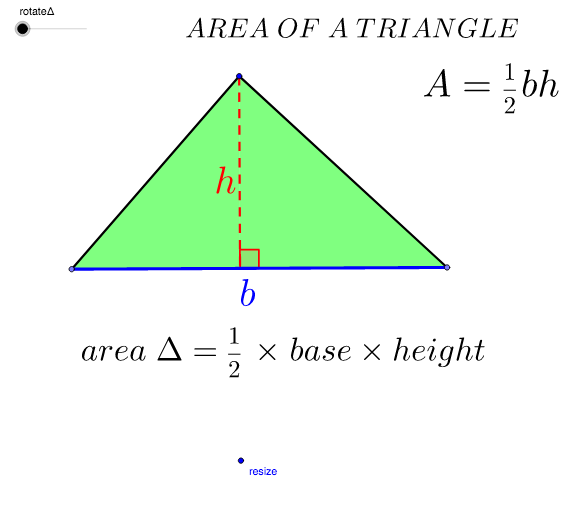
This example demonstrates how to calculate the area of a triangle using geometric construction. Key mathematical concepts include the properties of triangles and coordinate geometry. Using GeoGebra commands such as Segment, LineBisector, and Polygon, one can construct a triangle and calculate its area. Suitable for middle school and above students learning geometry and coordinate geometry.
GeoGebra Commands & Parameters
Segment(A, B) → ABLineBisector(AB) → bPoint(b) → DPoint(b) → CSegment(D, C) → CDOrthogonalLine(A, CD) → gSegment(C, A) → cSegment(D, A) → dIntersect(b, g) → EPolygon(C, E, A) → poly1, a_1, c_1, e_1Polygon(A, E, D) → poly3, d_4, a_2, e_3Midpoint(C, A) → FMidpoint(A, D) → HRotate(A, rotateΔ, H) → A'Rotate(E, rotateΔ, H) → E'Rotate(D, rotateΔ, H) → D'Polygon(A', E', D') → poly3', d', a', e'Rotate(C, rotateΔ, F) → C'Rotate(E, rotateΔ, F) → E'_1Rotate(A, rotateΔ, F) → A'_1Polygon(C', E'_1, A'_1) → poly1', a'_1, c', e'_1Midpoint(A, E) → JMidpoint(D, C) → KAngle(C, E, A) → αSegment(A, E) → aSegment(C, E) → iSegment(D, E) → jPolygon(D, C, A) → poly5, a_3, d_5, c_3Midpoint(D, E) → G
AI Drawing Prompt Reference
Draw a triangle ABC, construct segments AB, CD, and AE, and use these to construct altitudes and medians. Then rotate to construct triangle A'E'D', and calculate and display the area of triangle ABC.
The prompt above was compiled from the original drawing commands and is for reference only.