
Area of a Trapezoid by Patricia Loy
Loading the math board and drawing, please wait…
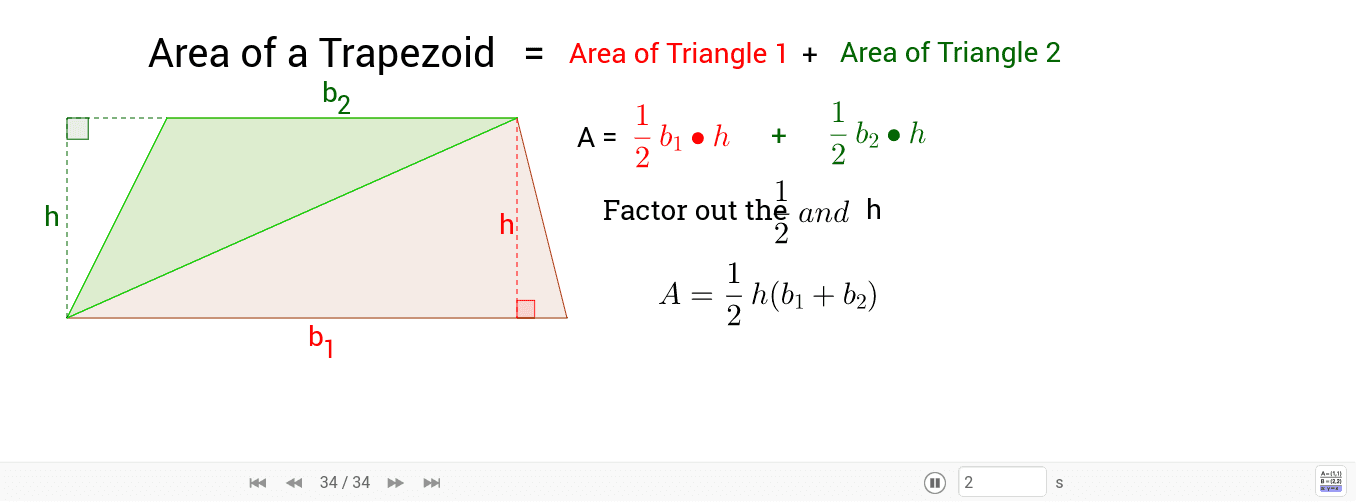
This example demonstrates the calculation of a trapezoid's area. Key mathematical concepts include geometry, area calculation, and arithmetic mean. Using GeoGebra commands such as Intersect, Point, and Polygon, the example dynamically shows the area changes of a trapezoid. Suitable for middle school and above students to learn geometry and area calculation.
GeoGebra Commands & Parameters
Intersect(xAxis, yAxis) → APoint(xAxis) → DPolygon(A, B, C, D) → poly1, a, b, c, dSegment(A, C) → fPolygon(A, B, C) → poly2, c_1, a_1, b_1OrthogonalLine(C, d) → gIntersect(g, d) → ESegment(C, E) → hAngle(D, E, C) → αLine(C, B) → iOrthogonalLine(A, i) → jIntersect(i, j) → FSegment(A, F) → kSegment(F, B) → lAngle(A, F, B) → β
AI Drawing Prompt Reference
Draw a trapezoid ABCD with A on the x-axis, B on the y-axis, D on the x-axis, and C on the y-axis. Use points A, B, C, and D to draw trapezoid ABCD and calculate its area. Then, connect AC. Use points A, B, and C to draw triangle ABC. Construct a perpendicular line from C to line CD, intersecting at point E. Connect CE. Construct a perpendicular line from B to line AC, intersecting at point F. Connect AF. Finally, calculate the area of the trapezoid.
The prompt above was compiled from the original drawing commands and is for reference only.