
Area of a circle: Geometric construction and area calculation
Loading the math board and drawing, please wait…
In collections
Geometry: Perimeter & Area
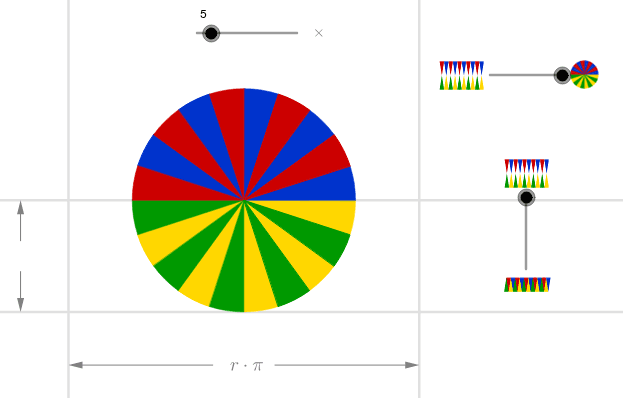
This example demonstrates how to calculate the area of a circle through geometric construction. The key mathematical concepts involved include the properties of circles, area formulas, and similarity transformations. Construction points include using GeoGebra commands such as Sequence, Point, OrthogonalLine, Mirror, Intersect, and Vector to create circles and related figures. Suitable for middle or high school mathematics learning to understand the geometric properties of circles and area calculation methods.
GeoGebra Commands & Parameters
Sequence((((2 * i) - 1) * a), i, 1, n) → anglesSequence(Vector[(d * Vector[(cos((-Element[angles, i])), sin((-Element[angles, i])))])], i, 1, n) → vectorsSequence(Midpoint[Cell[2, i], Cell[2, 1 + i]], i, 1, n) → midpointsSequence(Intersect[Circle[Cell[2, i], 1], OrthogonalLine[Element[midpoints, i], Line[Cell[2, i], Cell[2, 1 + i]]]], i, 1, n) → lowpointsSequence(Mirror[Element[lowpoints, i], yAxis], i, 1, n) → lowpoints2Sequence(Midpoint[Cell[3, i], Cell[3, 1 + i]], i, 1, n) → midpointsDownSequence(Intersect[Circle[Cell[3, i], 1], OrthogonalLine[Element[midpointsDown, i], Line[Cell[3, i], Cell[3, 1 + i]]]], i, 1, n) → uppointsSequence(Mirror[Element[uppoints, i], yAxis], i, 1, n) → uppoints2Point(yAxis) → BOrthogonalLine(B, yAxis) → gPoint(g) → CMirror(C, yAxis) → C'Point(h) → DMirror(D, (-2, -0.5)) → D'Intersect(b, xAxis) → EIntersect(c, h) → FIntersect(e, g) → GIntersect(g, f) → HVector(D', I) → uVector(D, F) → vVector(C', G) → wVector(C, H) → zSequence(CircleSector[Element[uppoints, i], Cell[3, 1 + i], Cell[3, i]], i, 1, n, 2) → sectorsDown1Sequence(CircleSector[Element[uppoints2, i], Mirror[Cell[3, i], yAxis], Mirror[Cell[3, 1 + i], yAxis]], i, 1, n, 2) → sectorsDown3Sequence(CircleSector[Element[lowpoints, i], Cell[2, 1 + i], Cell[2, i]], i, 1, n, 2) → sectors1Sequence(CircleSector[Element[lowpoints2, i] + ((2 * x(A)), 0), Mirror[Cell[2, i], yAxis] + ((2 * x(A)), 0), Mirror[Cell[2, 1 + i], yAxis] + ((2 * x(A)), 0)], i, 1, n, 2) → sectors3Sequence(CircleSector[Element[lowpoints, i], Cell[2, 1 + i], Cell[2, i]], i, 2, n, 2) → sectors2Sequence(CircleSector[Element[lowpoints2, i] + ((2 * x(A)), 0), Mirror[Cell[2, i], yAxis] + ((2 * x(A)), 0), Mirror[Cell[2, 1 + i], yAxis] + ((2 * x(A)), 0)], i, 2, n, 2) → sectors4Sequence(CircleSector[Element[uppoints, i], Cell[3, 1 + i], Cell[3, i]], i, 2, n, 2) → sectorsDown2Sequence(CircleSector[Element[uppoints2, i], Mirror[Cell[3, i], yAxis], Mirror[Cell[3, 1 + i], yAxis]], i, 2, n, 2) → sectorsDown4
AI Drawing Prompt Reference
Draw a diagram illustrating the calculation of the area of a circle. The diagram should include a center point and multiple sectors of the circle, formed by the center, points on the circumference, and line segments connecting the center to these points. It should also include symmetric line segments and points, using mirror transformations to reflect the figure about the center. The construction order should be: first draw the circle, then generate sectors based on points on the circumference, add symmetric line segments and points, and finally connect these points to show the relationship for area calculation.
The prompt above was compiled from the original drawing commands and is for reference only.