
Area Model Multiplication
Loading the math board and drawing, please wait…
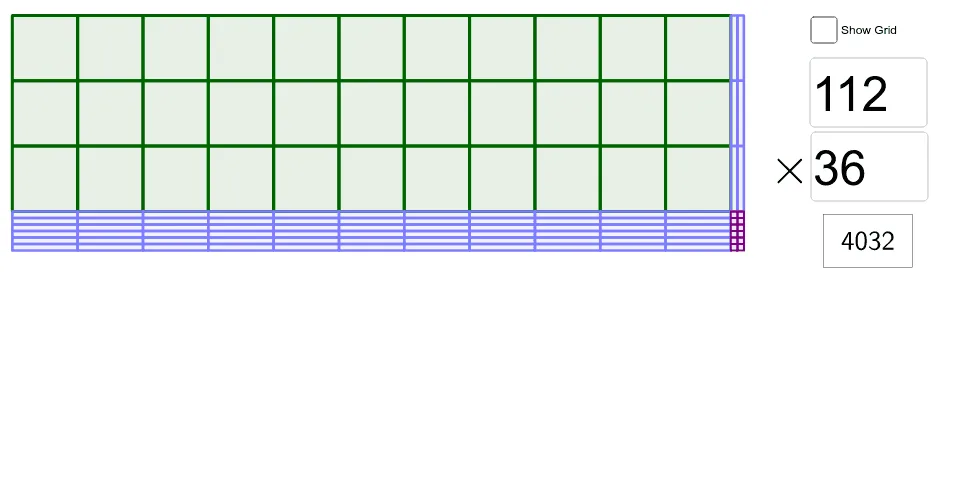
This example demonstrates multiplication using an area model. Key mathematical concepts include multiplication and geometry. It is constructed using GeoGebra commands such as Div, Textfield, and Sequence. Suitable for upper elementary or middle school students learning multiplication.
GeoGebra Commands & Parameters
Div(N, 10) → aTextfield(M) → InputBox1Textfield(N) → InputBox2Sequence(A - (0, (10 * k)), k, 0, Div[M, 10]) → vert10Sequence(A + ((10 * k), 0), k, 0, Div[N, 10]) → hor10Sequence(A - (0, (10 * Div[M, 10]) + k), k, 0, Mod[M, 10]) → vert1sSequence(A + ((10 * Div[N, 10]) + k, 0), k, 0, Mod[N, 10]) → hor1sSequence(Sequence[RectangleFromDiag[(x(Element[hor10, k]), y(Element[vert10, j])), (x(Element[hor10, k + 1]), y(Element[vert10, j + 1]))], k, 1, Length[hor10]], j, 1, Length[vert10]) → hundredsSequence(Sequence[RectangleFromDiag[(x(Element[hor10, k]), y(Element[vert1s, j])), (x(Element[hor10, k + 1]), y(Element[vert1s, j + 1]))], k, 1, Length[hor10]], j, 1, Length[vert1s]) → tensHSequence(Sequence[RectangleFromDiag[(x(Element[hor1s, k]), y(Element[vert10, j])), (x(Element[hor1s, k + 1]), y(Element[vert10, j + 1]))], k, 1, Length[hor1s]], j, 1, Length[vert10]) → tensVSequence(Sequence[RectangleFromDiag[(x(Element[hor1s, k]), y(Element[vert1s, j])), (x(Element[hor1s, k + 1]), y(Element[vert1s, j + 1]))], k, 1, Length[hor1s]], j, 1, Length[vert1s]) → ones
AI Drawing Prompt Reference
Draw a multiplication area model using rectangles, representing hundreds, tens, and ones. Start by creating rectangles for tens and ones, then add rectangles for hundreds. Each rectangle's size and position correspond to the multiplication values, using different colors or shading to clearly show the multiplication process and result.
The prompt above was compiled from the original drawing commands and is for reference only.