
Area Estimation with Upper Sum
Loading the math board and drawing, please wait…
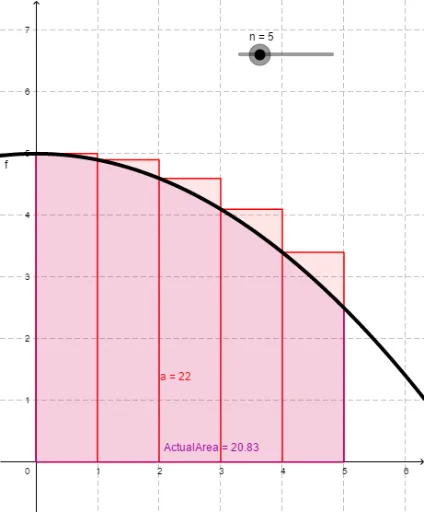
This example demonstrates how to estimate the area of a shape using the upper sum method. It involves core mathematical concepts such as definite integrals and upper and lower sums in integral calculus. The construction uses GeoGebra commands UpperSum and Integral, along with objects like f (function), n (number of intervals), a (lower limit of integration), and ActualArea (actual area). This example is suitable for beginners in calculus to learn how to approximate area by dividing the interval and calculating the maximum value in each subinterval.
GeoGebra Commands & Parameters
UpperSum(f, 0, 5, n) → aIntegral(f, 0, 5) → ActualArea
AI Drawing Prompt Reference
Draw a function graph and show how to estimate its area from 0 to 5 using the upper sum method. First, divide the interval into n subintervals, find the maximum value of the function in each subinterval, and sum these maximum values to get the upper sum. Also, calculate the actual integral area of the function from 0 to 5 and compare the upper sum with the actual area to demonstrate the estimation process.
The prompt above was compiled from the original drawing commands and is for reference only.