
Area Between Two Curves Rotated About the X-Axis
Loading the math board and drawing, please wait…
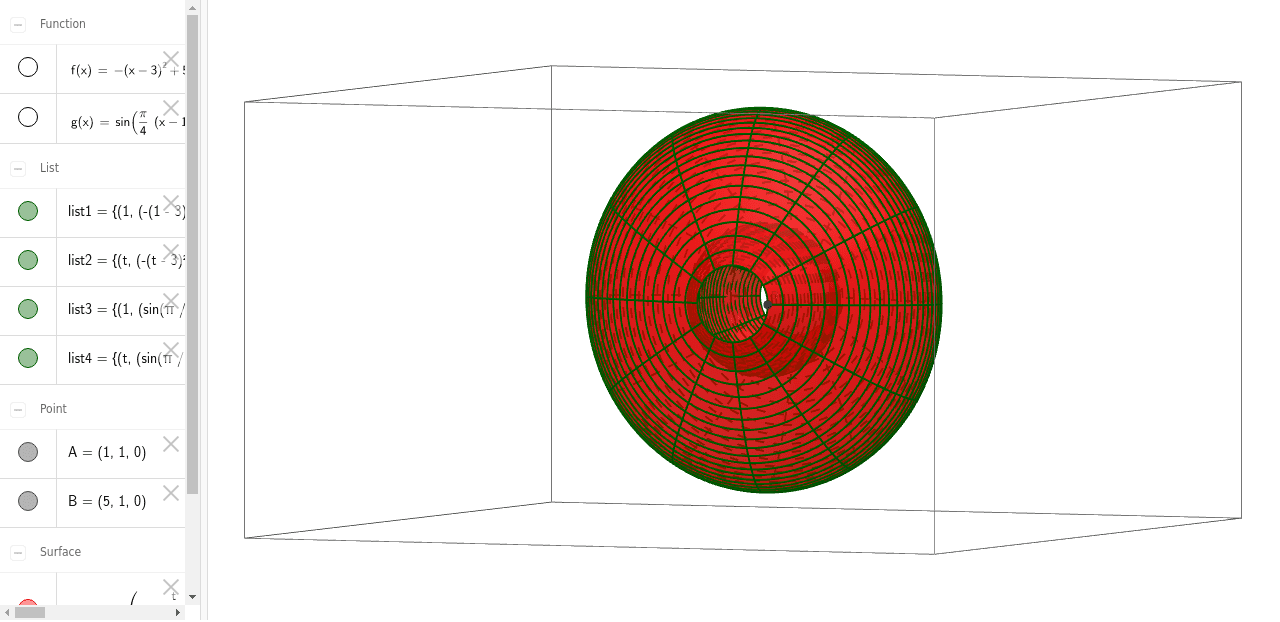
This example demonstrates the calculation of the area formed by rotating two curves about the X-axis. It involves core mathematical concepts such as the volume of solids of revolution, integral calculus, and the geometric properties of function graphs. Key construction steps include using GeoGebra's Intersect command to find intersection points, Sequence command to generate sequences, and Surface command to construct the rotated surface. It is suitable for high school and above students to understand the calculation of areas of solids of revolution in calculus, as well as the geometric transformations of function graphs.
GeoGebra Commands & Parameters
Intersect(f, g, (1.0000000000012235, 1.0000000000048939)) → AIntersect(f, g, (4.999999998194377, 1.0000000072224928)) → BSequence(CurveCartesian[t, (f(t) * cos(u)), (f(t) * sin(u)), u, 0, 6.283185307179586], t, 1, 5, 0.1) → list1Surface(t, (f(t) * cos(u)), (f(t) * sin(u)), u, 0, 6.283185307179586, t, 1, 5) → aSurface(t, (g(t) * cos(u)), (g(t) * sin(u)), u, 0, 6.283185307179586, t, 1, 5) → bSequence(CurveCartesian[t, (f(t) * cos(u)), (f(t) * sin(u)), t, 1, 5], u, 0, 6.28319, 0.5235987755982988) → list2Sequence(CurveCartesian[t, (g(t) * cos(u)), (g(t) * sin(u)), u, 0, 6.28319], t, 1, 5, 0.1) → list3Sequence(CurveCartesian[t, (g(t) * cos(u)), (g(t) * sin(u)), t, 1, 5], u, 0, 6.28319, 0.5236) → list4