
Area Between Two Curves by gabriela sanchis
Loading the math board and drawing, please wait…
In collections
BC Calculus
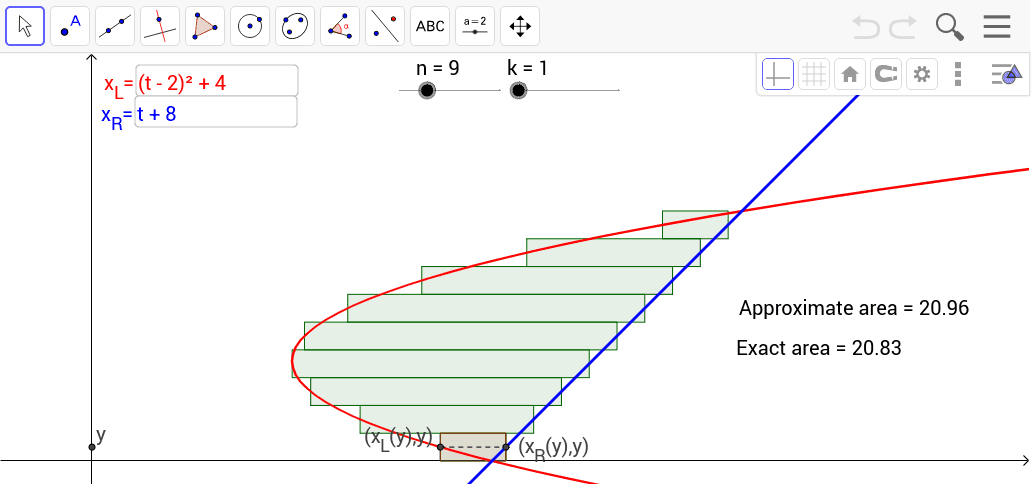
This applet illustrates the calculation of the area between two curves using the concept of Riemann sums. Key mathematical concepts include functions, integrals, and limits. It utilizes commands such as Intersect, Min, Max, Sequence, Element, Segment, Textfield, and IntegralBetween in GeoGebra. Suitable for high school mathematics education and learning.
GeoGebra Commands & Parameters
Intersect(c, a) → A, BMin(y(A), y(B)) → bMax(y(A), y(B)) → dSequence(Polygon[(f(b + (k - 1 / 2) * dx), b + (k - 1) * dx), (f(b + (k - 1 / 2) * dx), b + k * dx), (g(b + (k - 1 / 2) * dx), b + k * dx), (g(b + (k - 1 / 2) * dx), b + (k - 1) * dx)], k, 1, n) → list1Element(list1, k) → poly1Segment(C, D) → eTextfield(f) → inputBox1Textfield(g) → inputBox2IntegralBetween(g, f, b, d) → h
AI Drawing Prompt Reference
Draw the area between two curves f(x) and g(x). First, find the intersection points A and B of the two curves, then calculate the minimum y-value b and maximum y-value d at these points. Use b and d as the integration limits, input the expressions of f(x) and g(x) in the text fields, and calculate the integral of f(x) and g(x) over the interval [b, d] to get the area h. Finally, use this information to draw the area between f(x) and g(x), and display the text fields and calculation results.
The prompt above was compiled from the original drawing commands and is for reference only.